
How to Get SMS Alerts from Danfoss ADAP-KOOL / Alsense Refrigeration Systems
Danfoss makes it easy to get email alerts from your System Manager.
Danfoss makes it significantly less easy to get those alerts as text messages.
The ADAP-KOOL system (whether you’re on an AK-SM 800A, an older SM 800/850, or a legacy SC 255 that refuses to die) has pretty strong alarm email capabilities. Whether it’s compressor faults, temperature excursions, controller offline events, high discharge pressure — the System Manager sees it all and can email about it.
The problem? Email is where urgent alerts go to be ignored.
And if you’re not on Alsense (aka Danfoss’s cloud monitoring platform that’s priced for chains and enterprise accounts) email is your only built-in alarm channel. There’s no native SMS option on the System Manager, and there never was.
This article covers how to turn your ADAP-KOOL email alerts into SMS text messages. If SMTP is already configured on your System Manager, you’re about 60 seconds from your first text.
If it’s not, we’ll get that set up too.
Danfoss ADAP-KOOL SMS Alerts: Table of Contents
- Getting Text Alerts from Your Danfoss System Manager
- The Alsense Question (And Why You Might Not Need It)
- What Broke: Carrier Gateways and the DIY Dead End
- Get Started with text.email
- Which ADAP-KOOL Alarms Are Worth Texting?
- Danfoss ADAP-KOOL SMS Alerts: Next Steps
Note: This covers the AK-SM 800A, AK-SM 800/850, and AK-SC 255 System Managers. If you’re on the older AKM Windows-based monitoring platform, the alarm routing works through AKM’s Alarm Router software — different setup, same concept.
Getting Text Alerts from Your Danfoss System Manager
Your Danfoss System Manager can already send alarm emails. We’re going to use an email-to-text tool to bring those to your phone as SMS messages.
Here’s how.
Step 1: Sign up with text.email
text.email is the easiest email-to-SMS service out there; it’s literally a drop-in replacement.
You give text.email your phone number (and/or your teams’ numbers), and it gives you an email address. So anything sent to that address arrives as a text on your phone.
Sign up at text.email. You’ll get your own email subdomain so your address will be your-number@subdomain
text.email handles something called A2P 10DLC carrier compliance on its end, which is essential if you want your texts to actually get delivered (we’ll get into why in the What Broke? section). For now, just know that it’s handled.
We’re going to plug this address into your System Manager’s alarm settings in Step 3.
Step 2: Make sure email is properly configured on your System Manager
If you’re already getting alarm emails from your System Manager, skip to Step 3. Your email setup (and SMTP sending server) is working.
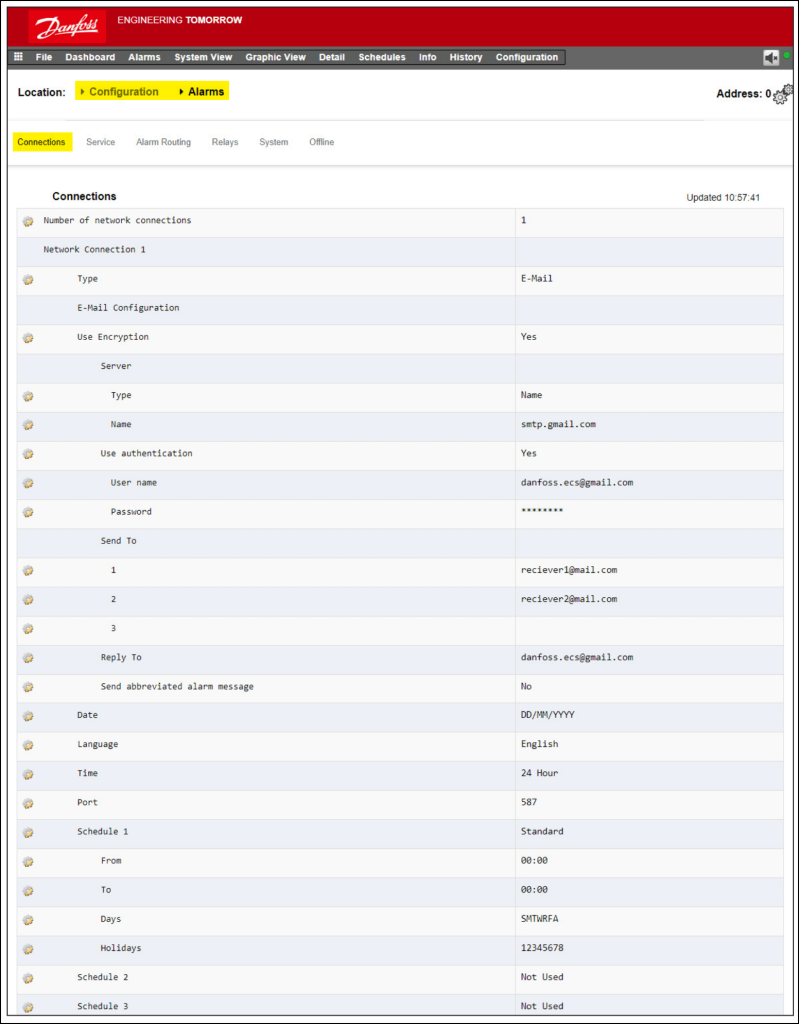
If not, you need to tell the System Manager how to send email. You’ll do this at Configuration → Alarms → Connections on the local touchscreen, StoreView Browser, or StoreView Web.
Using Gmail as your SMTP relay
Sending through your Gmail account’s sending server is the easiest (or, at least, most universal) method. Danfoss themselves publish a setup guide for it, though it’s a little out of date so we’ve got updated instructions here.
The first step is to generate an App Password, which Google now requires if you want some other tool to send through your account.
To generate one:
- Enable 2-Step Verification on the Gmail account (Google Account → Security).
- Go to Google Account → App Passwords. Create one named something like “Danfoss SM.”
- Google gives you a 16-character password. Copy it immediately since they won’t show it again.
Then fill in the Connections screen in System Manager:
- Mail Domain: smtp.gmail.com
- Port: 587
- Username: Your full Gmail address
- Password: The 16-character App Password
- Reply-to Address: Same Gmail address
That Reply-to field is mandatory and must be valid. If it’s not, the System Manager accepts the settings but silently drops every email.
Save, then test. Hit Send Test Email on the Connections screen.
Other SMTP servers
If you’re using a facility mail server, Microsoft 365, or any other server you’ll fill in the same fields, just with different values. You’ll need to get the SMTP address, port, and credentials from your IT team.
One crucial thing: the Reply-to address has to resolve to a valid user on that server.
DNS
The System Manager needs to resolve hostnames. Under Configuration → Network, make sure DNS is set. Google’s 8.8.8.8 and 8.8.4.4 work if your IT team doesn’t have a preference.
Step 3: Point your alarm emails at text.email
In System Manager, navigate to Configuration → System → Users.
- Create a new user or edit an existing one.
- In the Email field, enter your text.email address.
- Enable alarm notifications for this user.
- Save.
That’s it for the recipient. Now you need to tell the system which alarms to actually send.
Step 4: Configure alarm routing
Navigate to Configuration → Alarms → Alarm Routing.
The SM 800A has an Alarm Action Matrix that controls which alarms go where, with what delay, and under what conditions. It’s pretty flexible and perfect for our situation here.
The critical settings:
- Scheduling. Without a configured schedule, the System Manager won’t output any alarms. It’s the single most common misconfiguration on Danfoss systems and the first thing to check when alerts aren’t sending.
- Filter by type and application area. You can route Refrigeration alarms separately from HVAC, Lighting, and Misc. For SMS, you probably want refrigeration critical/fail alarms only.
- Send alarms when cleared: Optional. It’s up to you if you want alerts when all is clear.
- Time delays. For SMS-worthy alarms, set these to zero or near-zero. You’re routing to text because the alarm is urgent.
Step 5: Test
Go to Configuration → Alarms → Service.
Generate a test alarm. You should receive a text within seconds.
If you don’t:
- Check SMTP first. Go back to Connections, hit Send Test Email. If that doesn’t arrive, the issue is SMTP configuration.
- Check the schedule. No schedule = no alarm output.
- Check connectivity. Eth0 (WAN) needs outbound access. Some facility firewalls block SMTP from the controller VLAN.
- DNS failure alarm? Don’t panic yet. This fires when the mail server doesn’t send an acknowledgment and some servers just don’t. Check if the email actually arrived before troubleshooting DNS.
If you’re still on an AK-SC 255…
The SC 255 is end-of-life. Danfoss recommends the SM 800A as the replacement, and the upgrade path exists. But “end of life” and “out of the building” are different things, and plenty of these are still running.
The email alarm setup is similar but the interface is different, and you won’t have the Alarm Action Matrix; routing options are more limited. The email-to-SMS conversion works identically though.
Alsense Can Send SMS Alerts — But Do You Need It?
If you’ve looked into alarm notifications for Danfoss systems before, you’ve probably been pointed toward Alsense, Danfoss’s cloud monitoring platform (the artist formerly known as Danfoss Enterprise Services).
Alsense is a robust platform with remote monitoring, alarm management, energy analytics, HACCP compliance, fleet-wide dashboards. It’s hosted on Azure, it requires a VPN connection to your store, and… it comes with ongoing subscription pricing.
For a chain managing 200+ locations, it makes sense. The per-store cost amortizes into nothing, and you get centralized visibility that’s tough to replicate.
For a single facility? A small independent chain? A cold storage warehouse that isn’t part of a food retail fleet?
You’re paying for a cloud analytics platform to solve a notification delivery problem.
The System Manager already knows what’s wrong and can already email about it. The gap is getting that email to your phone as a text. That’s not a hundreds or thousands of dollars-per-month problem.
What Broke? Carrier Gateways and the DIY Dead End
For most of the past two decades, you could solve the SMS problem by putting a carrier gateway address in the email recipient field. For example, 5551234567@vtext.com for Verizon or 5551234567@txt.att.net for AT&T.
Today? Those gateways are gone. Every major U.S. carrier (Verizon, T-Mobile, AT&T, and beyond) has shut them down.
There were a few reasons. Lots of spam was one. New, strict compliance rules (which I mentioned briefly earlier in this article) were another. And the gateways weren’t generating revenue for the carriers, so when the regulatory cost went up, they pulled the plug.
If an LLM (or, uh, the Danfoss manual) tells you to use @vtext.com for your Danfoss alarm recipient, it’s working off stale training data.
Why building your own doesn’t scale
Yes, you could build your own pipeline: receive the alarm email, parse it, hit the Twilio API, send an SMS.
But sending application-to-person texts now requires 10DLC registration with The Campaign Registry. That means registering your business, registering your campaigns, waiting for carrier approval, and keeping your registration alive.
Yes, even for a handful of alerts a month from a single facility; it’s the same registration burden whether you’re alerting on a compressor fault or blasting 50,000 marketing messages. The compliance overhead is wildly disproportionate to the use case.
Get Started with text.email
We built text.email because the carrier gateways died and the replacement options were either enterprise-priced cloud platforms or DIY pipelines with disproportionate compliance requirements. There wasn’t a simple, compliant way to get an email alert onto your phone.
text.email plans include 200 SMS messages per month. For critical-alarm-only routing, you’re highly unlikely to hit that cap.
You can test it without signing up by sending an email to yournumber@text.email.
Which ADAP-KOOL Alarms Are Worth Texting?
The Alarm Action Matrix gives you granular control. Use it. Alert fatigue will kill the effectiveness of your SMS alerts faster than anything else.
Text immediately
- Temperature excursion above critical threshold. This is why the notification system exists, above all else.
- Compressor fault. Particularly on racks without redundancy. A pack controller reporting a compressor down is a clock that’s already ticking.
- Refrigerant leak detection.
- High discharge pressure.
- Controller offline. A case controller or pack controller dropping off the Modbus or LON network means you’ve lost visibility into that part of the system.
Text if you’re cautious
- Condenser fan failure. This isn’t an immediate loss event, but it can cascade fast under certain conditions.
- Repeated defrost overrun. Three consecutive overruns means coil icing.
- Suction pressure trending high. The ADAP-KOOL adaptive algorithms track this. If the system sends an alarm about it, it’s noteworthy.
- Power event / UPS failover.
Fine as email
- Scheduled defrost completions
- Setpoint adjustments
- Software update notifications
- Advisory-level events
- Energy feature status reports
Route critical and fail-level alarms through text.email. Leave the advisory and informational stuff in the inbox where it can be reviewed during business hours.
Danfoss ADAP-KOOL SMS Alerts: Next Steps
The Danfoss System Manager is already set up to send email alerts.
Unfortunately, email alerts are easy to miss. When something critical breaks, a text message cuts through the noise and gets to you fast.
And the easiest way to get text alerts going — truly, in a matter of minutes — is with the system we laid out in this article.
- Sign up at text.email.
- Add your address in System Manager.
- Set the Alarm Action Matrix to route critical alarms to that address.
- Test and go.
And that’s it. Your System Manager already knows what’s going wrong — now it can tell you in a way you’ll definitely see.
Send an email to
your-number@text.email
and receive it as a text in seconds. No signup required.