
How to Get Critical Text Alerts from Your SCADA System
Most SCADA platforms have been able to send email alerts for years.
But getting an email about a pump fault is useless if you don’t see it for 45 minutes.
Email doesn’t interrupt you — it sits in an inbox until you happen to check it, and for critical alarms, “when you happen to check” isn’t fast enough.
This is especially true at smaller facilities. If you’ve got two operators splitting on-call and nobody watching screens at 2 AM, you need alarms that behave like something urgent. That means SMS.
I’ll walk you through turning your SCADA system’s existing email alerts into text messages on your phone. This works across Ignition, VTScada, AVEVA, FactoryTalk, GE iFIX, Geo SCADA — anything that can send an email.
If SMTP is already configured, you’re looking at about a minute of setup.
We’ll also get into why the older methods for SCADA SMS have either died or become disproportionately expensive for what small operations need.
SCADA System Text Alerts: Table of Contents
- Setting Up SMS Text Alerts from Your SCADA System
- Why Older SCADA SMS Methods Stopped Working
- Ready to Get Started?
- Which SCADA Alarms Deserve a Text Message?
- SCADA System Text Alerts: Next Steps
Setting Up SMS Text Alerts from Your SCADA System
Your SCADA system sends an email, that email arrives as a text on your phone. No middleware, no hardware, no Twilio account.
Step 1: Sign up with text.email
text.email is an email-to-text service — the only one where you sign up and start receiving texts immediately. You send an email to a special address, it shows up as a text.
text.email handles A2P 10DLC carrier compliance automatically (more on why that matters later).
Sign up and you’ll get an email address that’s: your-number@subdomain.text.email
Any email sent to that address arrives as a text. You’ll plug this into your SCADA notification settings in Step 3.
Step 2: Make sure your SCADA system has SMTP configured
If you’re already receiving email alerts, skip to Step 3. SMTP is working and you don’t need to touch it.
If not, you need to set up an outbound SMTP connection. The navigation depends on your platform:
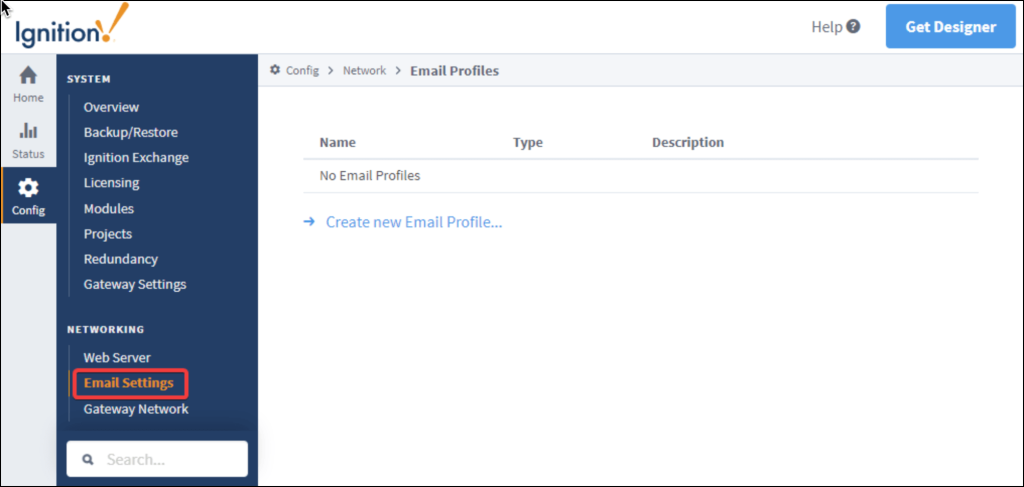
Ignition: Gateway → Config → Alarming → Notification → Email Settings. Version 8.1+ supports OAuth2 SMTP profiles.
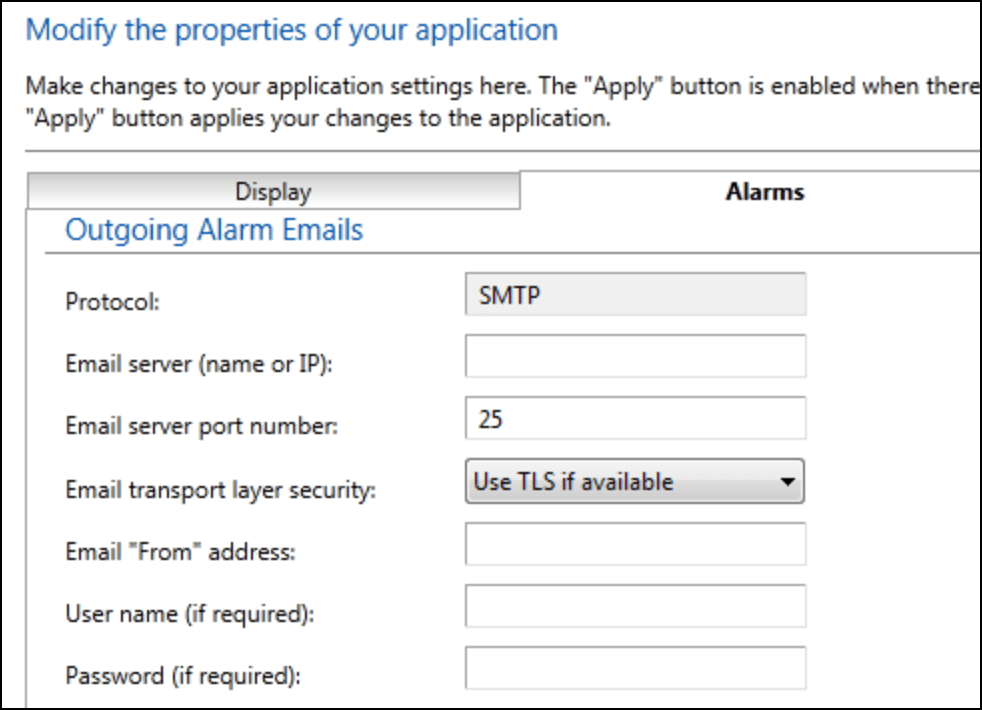
VTScada: Application Configuration → Edit Properties → Alarms tab → Outgoing Email. Requires an external SMTP server. Recent versions support OAuth 2.0.
AVEVA System Platform / Wonderware: SMTP config under Alarm Notification in the Management Console. Varies by version.
Schneider Geo SCADA (ClearSCADA): Email Action under alarm redirection rules.
FactoryTalk View SE: SMTP settings in FactoryTalk Alarms and Events notification server properties.
GE iFIX: Alarm notification through the Alarm ODBC add-on or custom SMTP scripting.
Using Gmail as your SMTP relay
Google killed “Less Secure Apps” access, so your regular Gmail password won’t work for SMTP anymore. You need an App Password.
Enable 2-Step Verification on the Gmail account, then generate an App Password at Google Account → App Passwords. Google gives you a 16-character code — that’s what goes in the SMTP password field.
- SMTP Server: smtp.gmail.com
- Port: 587
- TLS/SSL: Yes
- Username: Your full Gmail address
- Password: The 16-character App Password
If your facility runs its own mail server or Microsoft 365, get the SMTP details from your IT team. (If you’re not sure what SMTP server to use, we’ve got a guide for that too.) One thing worth knowing: the sender address must be a valid account on the SMTP server. The SCADA system will happily accept an invalid sender without complaint — emails just won’t go out.
Step 3: Add your text.email address as an alarm recipient
In your SCADA system’s alarm notification settings, add a new contact or recipient with the email address: your-number@subdomain.text.email
Ignition: In your Alarm Notification Pipeline, add a user to your On-Call Roster with the text.email address as their email contact. Ignition’s pipeline system lets you route different alarm priorities to different contacts — critical to SMS, advisory to email.
VTScada: Add the text.email address to a contact in your Alarm Notification System roster. Put it in the email field, not the SMS field. VTScada’s SMS functionality relied on carrier gateways that no longer work. The email path is your replacement.
Geo SCADA / ClearSCADA: Add the text.email address as the recipient in your Email Action. Alarm redirection rules control which alarms trigger it.
Everything else: Find wherever you configure email recipients for alarm notifications. It’s a standard email address — anywhere your SCADA system sends email, it can send a text through text.email.
Step 4: Configure alarm filtering
You don’t want a text for every advisory and setpoint adjustment. That’s how you get alert fatigue, and alert fatigue means operators start ignoring texts the same way they ignored email.
Most SCADA platforms let you filter by priority, category, or area. Route critical and high-priority alarms to the text.email recipient. Leave the rest on standard email. I’ve got specific recommendations later in this article.
Step 5: Test it
Trigger a test alarm or use your platform’s built-in email test. Confirm the text arrives.
If it doesn’t, start at the SMTP layer — can the SCADA system send a regular email to any address? If that’s not working, the problem is upstream of text.email.
The most common issue in industrial environments: the SCADA server sits on a segmented OT network and can’t reach an SMTP server. You need port 587 open for outbound SMTP from the SCADA server’s VLAN, or a mail relay on the OT side. Your integrator or network admin will know the right approach for your architecture.
Once a test text hits your phone, you’re done. Every alarm that passes your filters arrives as SMS.
Why Older SCADA SMS Methods Stopped Working
The carrier gateways are dead
Some SCADA systems had built-in SMS that worked by emailing carrier gateway addresses — 5551234567@vtext.com, 5551234567@txt.att.net, that kind of thing. VTScada’s Alarm Notification System is a well-known example. The SCADA system just emailed an address that the carrier converted to SMS on the other end.
Those gateways are all dead or dying. Verizon killed vtext.com. AT&T shut down txt.att.net. T-Mobile’s tmomail.net is non-functional. The carriers pulled them because of A2P 10DLC compliance costs and spam abuse — no revenue, increasing regulatory burden, so they all pulled the plug.
If your platform’s documentation still references carrier gateway addresses, you’re configuring a path to infrastructure that no longer exists. A lot of SCADA vendor documentation hasn’t been updated to reflect this.
(If an LLM recommended @vtext.com? Same issue:outdated training data.)
Dedicated alarm notification software is built for bigger operations
WIN-911, SCADALRT, ScadaPhone — purpose-built alarm notification systems that integrate via OPC or direct connectors. Escalation logic, shift-aware routing, and voice callouts.
They start at several thousand dollars for the software license, require installation on or adjacent to your SCADA server, and come with annual support contracts. For a large facility with complex escalation across multiple shift teams, worth it. For a small plant where one or two people need a text when a pump faults, that’s a lot of infrastructure for a simple problem.
DIY means compliance paperwork
A Twilio account and a script sounds reasonable until you hit A2P 10DLC registration. Registering your organization with The Campaign Registry, describing the purpose of your messages, waiting for carrier approval — the same process whether you’re sending 5 alerts a month or 50,000 marketing messages.
For a municipal utility that just needs “tell me when something faults,” that’s a disproportionate amount of overhead.
Hardware cellular modems work but add moving parts
Cellular modems (Robustel, MultiTech) installed on the SCADA network can send SMS directly through a SIM card via AT commands. They bypass the carrier gateway problem entirely.
They also add another piece of hardware to maintain, another SIM to keep active, and another failure point that tends to fail silently. You find out the modem lost signal or the SIM expired when the 3 AM alarm doesn’t arrive.
Ready to Get Started?
We built text.email because the carrier gateways died and nothing replaced them for the people who needed them most — operators running small and mid-sized facilities where the full-scale alarm notification platforms don’t make sense.
Paid plans include 200 SMS messages per month… and for a facility routing only critical SCADA alarms to text, most months you won’t get close to that cap.
You can test it without signing up: send a test email to yournumber@text.email and you’ll get the text in seconds.
Which SCADA Alarms Deserve a Text Message?
The goal is to keep SMS reserved for alarms that need a human response within minutes. Everything else stays on email where it belongs.
Always text
- Pump failure at a lift station. Especially without redundancy. The SSO clock starts immediately and you’re in regulatory territory fast.
- High wet well level. If pumps aren’t keeping up, you need to know before it becomes a bypass event.
- Loss of communication to a remote site. Power outage, radio failure, or something worse — either way, you’ve lost visibility.
- Chlorine residual out of range. Too high or too low, this is a compliance event developing in real time.
- Power failure or UPS on battery, at the plant or remote sites.
- Intrusion or unauthorized access at unmanned facilities.
Worth considering
- VFD faults. Not always immediate, but if that drive is running your only RAS pump, the process impact compounds in a hurry.
- Wet well trending toward critical. The early warning before the actual critical alarm fires. Gives you a head start.
- Abnormal flow that doesn’t match the time of day. Could be I&I, a main break, or a failed instrument.
- Generator running / transfer switch activated. Not urgent if the generator’s healthy, but worth knowing about.
Leave on email
Setpoint changes, mode transitions, scheduled maintenance reminders, report confirmations, calibration alerts, “communication restored” notifications, timer-based events. The routine operational noise that matters for record-keeping but doesn’t need to interrupt your evening.
The simple rule: Priority 1/Critical goes to SMS. Priority 2/High gets evaluated case-by-case based on what’s behind it. Everything else stays on email.
SCADA System Text Alerts: Next Steps
Sign up at text.email, add your address to your SCADA system’s alarm notification recipients, filter to the alarms worth waking up for, and you’re set.
The setup goes into your existing email notification config — it’s same field where you’d put any recipient address. Only now, they come through as texts.
Send an email to
your-number@text.email
and receive it as a text in seconds. No signup required.