
How to Get FlightAware Text Alerts (After FlightAware Killed Them)
You’re looking for FlightAware text alerts and you wound up here because… well… like so many others, you just found out they don’t offer SMS notifications.
They never have, actually. There used to be a workaround — but that’s dead now too.
See, FlightAware does offer email alerts. So up until 2025, FlightAware users could get text alerts by using a little-known trick: Your cell phone provider could automatically convert email-to-text.
You’d enter your carrier’s email-to-text address (like yournumber@vtext.com) into the alert settings. FlightAware themselves even recommended this approach in their forums. But those carrier gateways have all shut down (more on that later in this article) — and they took FlightAware’s text alerts down with them.
Well, until now.
The good news: there’s a new way to turn FlightAware alerts about departures, arrivals, delays, and more into texts. And I can get you set up on it in about two minutes flat — maybe less.
FlightAware Text Alerts: Table of Contents
- Setting Up FlightAware Text Alerts with text.email
- What Happened to the Old FlightAware Text Alert Method?
- Why Push Notifications Aren’t a Real Replacement
- FlightAware Text Alerts: Pricing and Getting Started
- Who Benefits Most from FlightAware Text Alerts?
- FlightAware Text Alerts: Next Steps
Setting Up FlightAware Text Alerts with text.email
As I mentioned in before, FlightAware already sends email alerts. So we just need to route those emails to your phone as texts.
And we’ll do that with email-to-SMS via text.email.
It’s a tool where if you send it an email, it shows up as a text message on your phone.
Step 1: Sign up for text.email
First up, you’ll need to create a text.email account. During that process you’ll pick a private subdomain during signup, and this becomes part of your unique email address: your-number@subdomain.text.email
You’ll put that address into FlightAware momentarily.
Step 2: Set up your alert in FlightAware
Log into your FlightAware account and navigate to your alerts page. (It’s the bell on the top right.)
Either click “Set up a new alert” to create a new alert, or click the pencil icon to edit one of your current alerts.
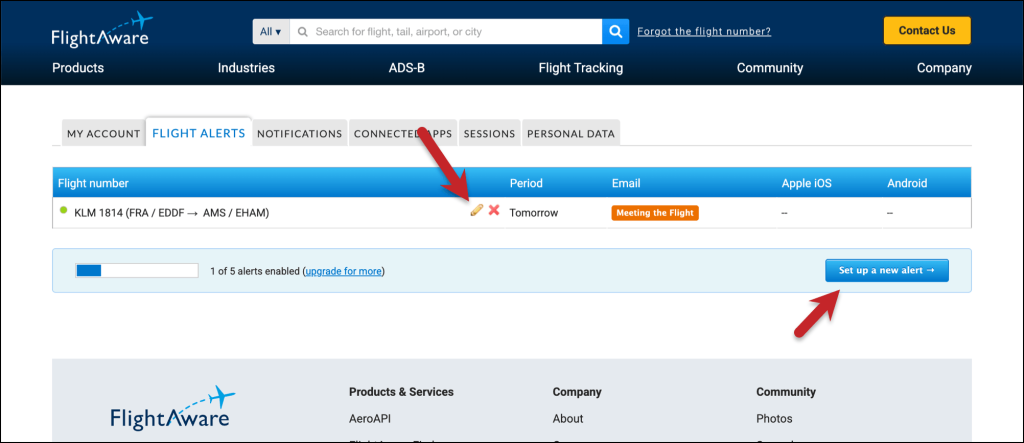
Step 3: Send the alerts to text.email
Under step 4, “Where should we send these alerts?”, you’ll see options for your primary email and “Share this alert with a friend.”
Check that “share with a friend” box, and enter your text.email address: your-number@subdomain.text.email
Then click Save.
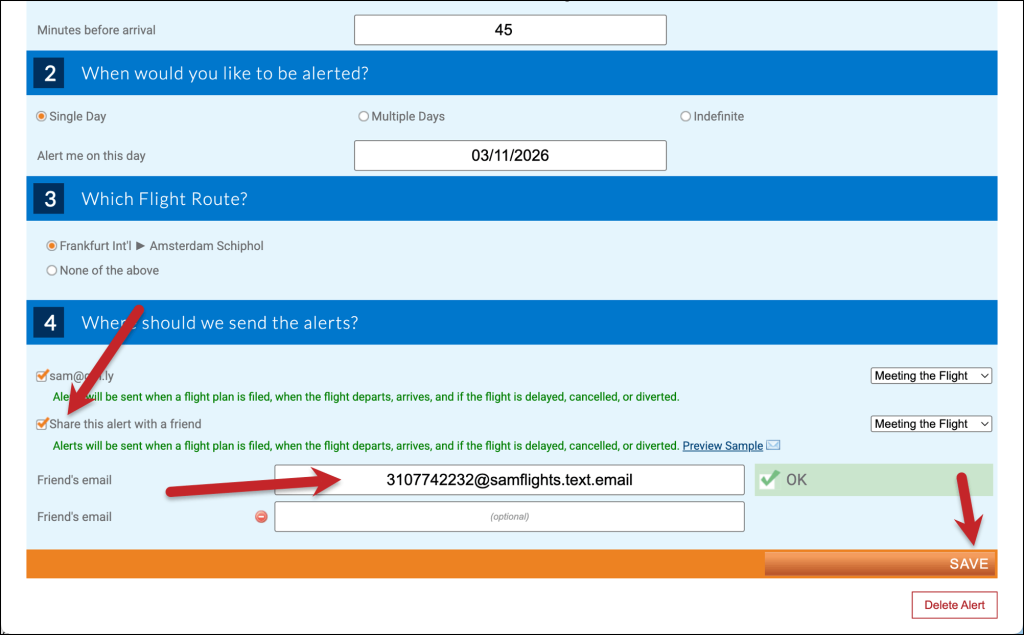
FlightAware will now send the alert email to your text.email address, and text.email delivers it to your phone as a text.
What about multiple day alerts?
FlightAware only has the “Share with a friend” option for multi-day alerts.
So you have a few options there:
Change the primary address for your account to your text.email address
You’ll still be able to grab the confirmation code (it will arrive in a text) so this is possible. It’s not elegant and it’s a little hacky, but it will work.
Set up forwarding
You can use Gmail (or Outlook, or any other email system’s) email forwarding features to forward your FlightAware alerts to your text.email address.
For instance, in this screenshot, I’m setting up a filter to forward alerts from FlightAware that include the word “delayed.” I could also set up general filters to forward about specific flights, airlines, or any other info that comes in the alerts.
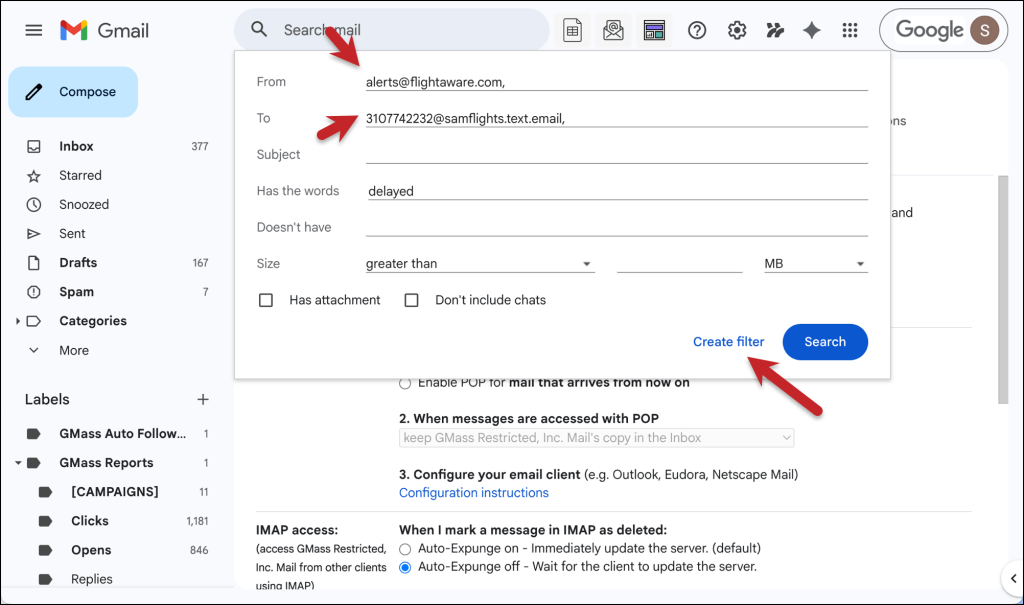
Now these alerts will come to by phone as texts (albeit with a slight delay as they work through the pipes from FlightAware -> Gmail -> text.email).
What Happened to the Old FlightAware Text Alert Method?
So right off the bat, it’s important we note: FlightAware never had a true built-in SMS alerting feature.
What they had was a field where you could enter your phone’s carrier email address, and the carrier’s gateway would convert that email into a text. Those were addresses like @vtext.com for Verizon, @txt.att.net for AT&T, and @tmomail.net for T-Mobile.
Those gateways are all dead now.
Verizon, AT&T, and T-Mobile all shut down (or neglected into death) their email-to-text gateways over the past couple of years. The official reasons were too much spam and new regulations around automated text messaging. (Unofficial reason? I’m pretty sure those services weren’t bringing in big money so they weren’t worth the hassle.)
When the gateways went down, the text alert workaround went with them. People who’d been getting FlightAware texts for years suddenly stopped receiving them with no explanation or notice. I mean, you might still think you should be getting them and now you’re just realizing you haven’t gotten one in like two years.
The FlightAware forums are still buzzing to this day with people still trying to figure out what happened.
Maybe I’ll go in there and self-promote this article. People on message boards love that, right?
Why Push Notifications Aren’t a Real Replacement
FlightAware does offer mobile push notifications through their app. They’re fine, but they aren’t as effective as a text.
If you’re anything like me — which, for your sake, could be a good or bad thing depending on the day — you miss push notifications all the time. They deliver silently or just disappear or don’t show up at all.
But you never miss a text. And that’s why you’re here and also why text.email exists.
What about vibe coding your own solution?
So could you just wire up your own solution here? I mean, sure. You and the sexy LLM du jour could wire up a way to turn FlightAware’s email alerts into texts using Twilio or a similar SMS API.
But there are two issues. One, that’s a whole system to maintain, so you’re building yourself an ongoing project.
Two, and even bigger, there’s a regulatory layer that makes this harder than it looks.
Since 2023, all application-to-person text messages have go through officially registered campaigns or the messages will quietly go undelivered. That means registering your brand, registering your campaign, getting carrier approval, and maintaining ongoing compliance with proper STOP/HELP handling.
It’s called A2P 10DLC, and it’s the reason you can’t just spin up a Twilio number and start sending texts like you could a few years ago. The registration process alone can take weeks and costs ~$75.
So between the system to build and maintain (that costs money and takes time) and the regulatory issues (that cost money and take time), it’s just so much easier to go with the system I’ve described here. (Which takes zero time and ultimately will cost you roughly the same amount.)
FlightAware Text Alerts: Pricing and Getting Started
When you’re ready to get started, you can subscribe to a plan at text.email.
The plans include 200 text messages per month, which should be more than enough for you unless you’re doing some hardcore flight tracking.
Want to try it before committing? Send any email (even a FlightAware alert, as a test) to yournumber@text.email. It’s totally free and you don’t have to sign up for anything to try it.
Who Benefits Most from FlightAware Text Alerts?
- FBO operators and line service coordinators.
- Charter and flight department coordinators.
- GA aircraft owners and managers.
- Executive assistants and travel coordinators.
- Pilot and crew families.
- Freight and logistics coordinators.
- Serious flight enthusiasts.
FlightAware Text Alerts: Next Steps
The setup takes about a minute: sign up at text.email, grab your text.email address, and paste it into FlightAware’s “share this alert with a friend” field. Every selected departure, arrival, delay, diversion, and cancellation alert can become a text on your phone.
If you’re already using FlightAware’s email alerts, you’re one field change away from getting those same alerts as texts. And if you’ve been wondering why FlightAware text alerts stopped working, now you know, and now you’ve got a fix.
Send an email to
your-number@text.email
and receive it as a text in seconds. No signup required.