
How to Get Irrigation System Failure Text Alerts (5 Minute Setup)
So a flow sensor trips… or a wire fault kills a station… or a mainline break starts dumping water… or some other epic catastrophe happens.
Good news: Whatever irrigation system you’re using can send you an alert.
Bad news: Odds are, that alert comes via email. Yeah, some systems can do text messaging, but not all of them and not to everyone who needs the text.
And I’m thinking you’re here because you don’t have one of those systems that can easily send texts… and you really wish it could.
It can. And we can pull it off in less than five minutes with no new hardware and no call to your Galcon or Rain Bird or Toro rep required.
Irrigation System Text Alerts: Table of Contents
- Setting Up Irrigation System Text Alerts for Galcon, Rain Bird, and Toro
- Why Do You Need to Use This Workaround to Send Alert Texts from Your Irrigation System?
- Time to Get Irrigation System Alerts Texted to You
- Which Irrigation Alarms Should Actually Hit Your Phone?
- Get Your Irrigation System Text Alerts Running Today
Setting Up Irrigation System Text Alerts for Galcon, Rain Bird, and Toro
We’re going to use an email-to-text system here, since that’s the absolute fastest and easiest (and least expensive) way to get this done.
Sign up for an email-to-text service
Head over to text.email and create an account. (text.email is the easiest service to use for this, since it doesn’t require you to handle your own compliance paperwork or sign up for multiple levels of escalation or anything.)
You’ll get an email address like your-number@subdomain.text.email
So instead of adding a regular email to your controller’s notification list, you’re adding this one.
Add your text.email address to the Controller
The idea is the same across every irrigation system: find the notification settings on the platform and put your text.email address in an email field. Here are quick instructions for the three systems people ask me about the most.
Galcon GSI / GSI PRO
Your Galcon GSI alert settings are in the G.S.I. web application, not on the controller itself.
Faults get picked up locally and then pushed to Galcon’s cloud, which is where notifications actually go out.
Head to the platform and click into the unit you want alerts for. From there, go to Settings > Alert Settings.

You’ll see the Unit Alert Settings screen with your alert types: Low Flow, High Flow, No Water Flow, Water Leak Alert. Make sure Send Email Messages is checked at the top.
Next, check the Send Message box for each alert type you want on your phone. Your text.email address goes in the email recipient field for your account.
One setting probably worth tweaking: Combined Mails Period controls how often batched alerts go out. Default is 10 minutes. For critical alerts, I’m not sure you want to wait that long — and you really should save text messages for critical alerts so you don’t go “blind” to them.
Toro Rain Master iCentral
The Toro Rain Master Eagle Plus notifications are in the iCentral platform.
Click Setup in the top menu, then Account Setup. As you can see in this screenshot I grabbed from their instruction manual, which shows Internet Explorer in Windows 95. See why we need to intervene here
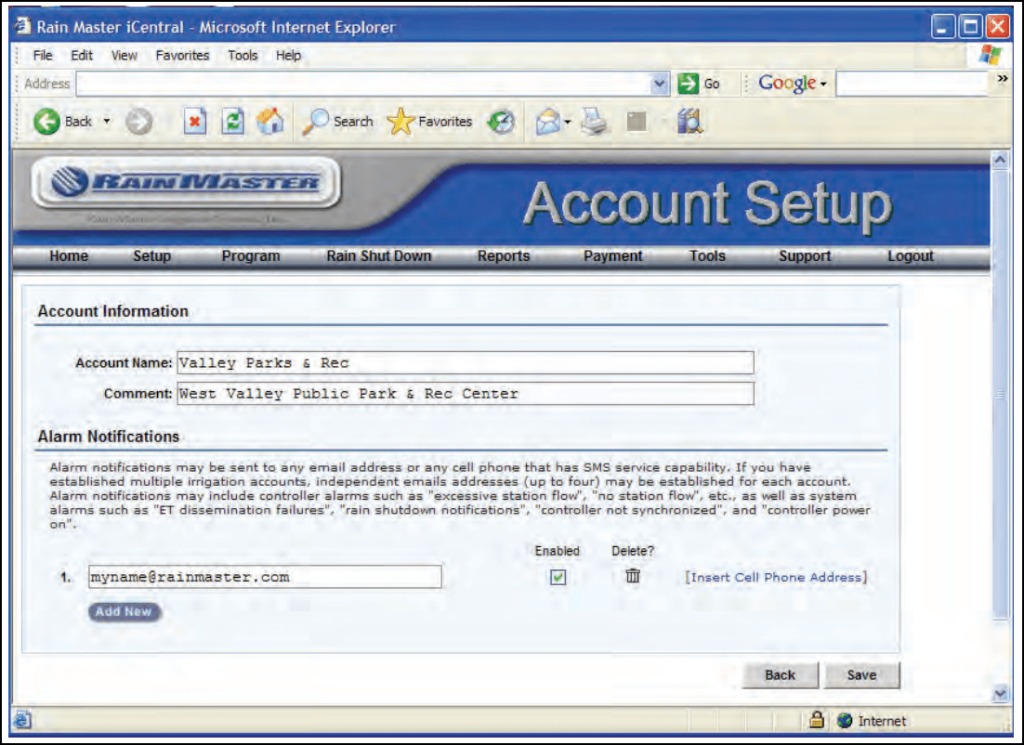
Scroll down to Alarm Notifications. You’ll see up to four email address fields, each with an Enabled checkbox next to it.
Drop your text.email address in one of those fields and check Enabled.
Hit Save and you’re set. iCentral will email your text.email address whenever a fault triggers.
Rain Bird IQ4
Rain Bird IQ4 is a bit different. It already has a built-in Text channel that sends SMS directly to a mobile number in your profile. If you’re paying for that, you don’t need this method.
So why bother with this email-to-text? That’s easy: you can route alerts to anyone’s phone without adding them as a system user. Adding system users is a cumbersome (and expensive process). This is a fast and inexpensive one that can be working in the next few minutes.
To set these up, log into the Rain Bird platform. Click your Profile Icon up in the top right, then Profile, then the Notifications tab.
You’ll see all 12 alarm types with Email and Text toggle switches next to each one. Flip the Email toggle on for whichever alarms you want as texts.
Now for the address: go to Profile > Preferences > Account and enter your text.email address in the Email field. That’s where Rain Bird sends email notifications.
And yeah, you can keep Rain Bird’s native Text toggle on for yourself and use text.email through the Email toggle for other people. They operate independently.
Why Do You Need to Use This Workaround to Send Alert Texts from Your Irrigation System?
The method I just laid out is easy, but it’s not exactly a native solution. It’s a bit of a hack and a bit of a workaround.
So why is this so hard?
Well, mainly, it’s because it’s a lot more complicated (and regulated) for a system to send a text than to send an email. So the functionality is rarely built into systems (or if it is, like with Rain Bird, they charge you extra for it).
And the two alternatives you might be thinking of are also fatally flawed…
Didn’t the cell phone companies used to offer email-to-text?
Yep. They sure did.
Toro iCentral’s documentation — which, as I noted earlier, uses screenshots of Windows 95 — still tells you to enter a “cell phone address” for SMS alerts. That means a cell phone carrier gateway address like 5551234567@vtext.com for Verizon.
And in their defense, those used to work. The major carriers (and minor carriers, RIP Cingular) all had email-to-text gateways that would turn an incoming email into an SMS on your phone.
Those are gone (for a variety of reasons, from some regulatory stuff we’ll discuss momentarily to the fact that the services didn’t bring in any extra revenue).
Now, if you’re still using one, messages get silently dropped, delayed by hours, or never show up.
If you’ve had a carrier gateway address in your iCentral alarm notifications (or elsewhere) for years and noticed you haven’t gotten an alert text in a year or so, that’s what happened.
So why not just rig up your own system?
The other “sounds good but isn’t” option is building your own SMS pipeline with something like Twilio. You (or, really, Claude or ChatGPT) will write up some software that converts alert emails into texts.
If you think that’s worth it to save a few bucks a month, go for it. But be warned: There’s something you’ve never heard of that’s going to wildly overcomplicate the process.
It’s called A2P 10DLC. That’s the official registration system for application-to-person text messaging. It’s part of the reason the carrier gateways shut down. It requires a long registration and application process, because it’s really made for companies sending thousands of marketing texts.
Not for an irrigation manager who needs to know about a mainline break.
text.email takes care of all that registration and compliance for you. You just use the email address.
Time to Get Irrigation System Alerts Texted to You
Alright, you’ve seen the whole setup for Galcon, Rain Bird, and Toro.
Ready to get rolling? Start with step 1, heading over to text.email to get your email-to-SMS address.
You can also try this out first. Send a test email to yournumber@text.email right now to see it in action. No signup needed; again, this is supposed to be the most low-friction way to pull this off.
Which Irrigation Alarms Should Actually Hit Your Phone?
Figured I can give you a rough jumping off point for which alarms should and shouldn’t come as texts. Feel free to ignore this if I have no idea what I’m talking about.
Text these (immediate action required):
- High Flow / Mainline Break (Rain Bird IQ4), Excessive Station Flow (Toro iCentral), High Flow (Galcon GSI)
- No Flow / No Water Flow / No Station Flow
- Short Circuit / Wire Fault
- Water Leak Alert / Unscheduled Flow
- Power Failure / Controller Power On
- Low Battery (Galcon GSI)
Leave on email (informational, not urgent):
- Irrigation Suspended by Sensor / Rain Shutdown
- ET dissemination failures (Toro iCentral)
- Irrigation Paused by Sensor (Rain Bird IQ4)
- Controller sync warnings
- Scheduled runtime reports (Rain Bird IQ4)
Get Your Irrigation System Text Alerts Running Today
You don’t need new hardware. You don’t even need to call IT.
Sign up at text.email, add the address to your Galcon GSI, Rain Bird IQ4, or Toro iCentral notification settings, and you’re done.
Send an email to
your-number@text.email
and receive it as a text in seconds. No signup required.