SMS Encryption in text.email: Keep Your Sensitive Data Secure
We’ve got a new security feature in text.email: Encryption.
If you’re sending any sensitive information through email-to-SMS, you can now encrypt those messages before they’re stored in your SMS history in our database.
SMS Encryption: Table of Contents
- Setting Up SMS Encryption in text.email
- How Does Encryption Work?
- Ready to Get Started with SMS Encryption?
Setting Up SMS Encryption in text.email
Go into your text.email account’s Settings page.
Scroll down to Encryption.
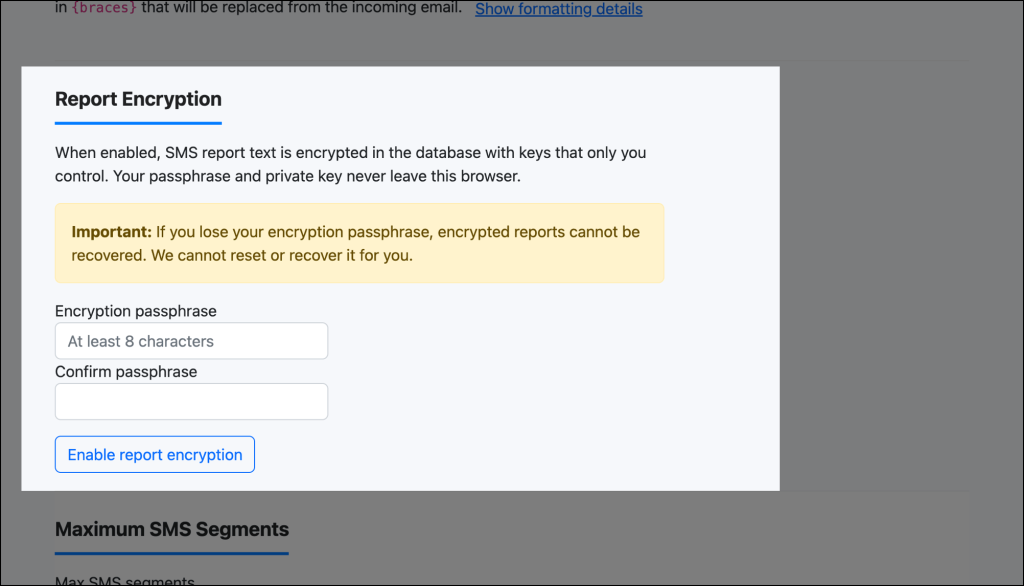
There, you’ll need to set up an encryption passphrase that’s at least 8 characters.
Type it in again to confirm the passphrase, then click Enable encryption.
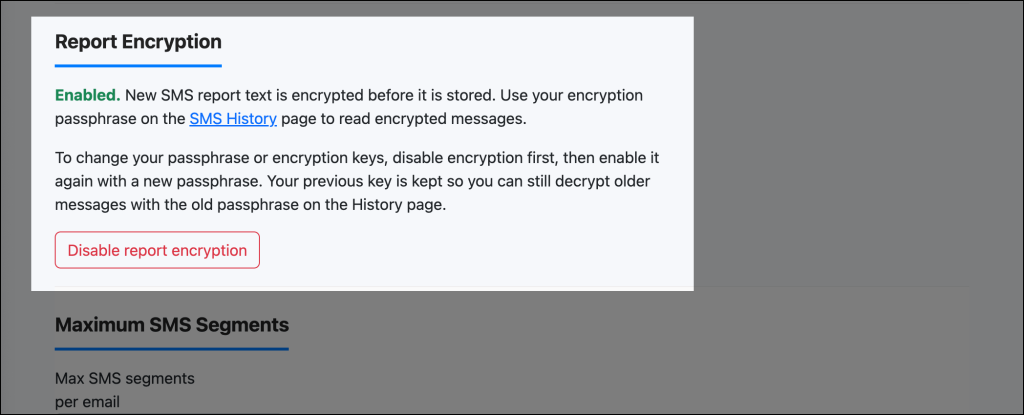
If you ever want to turn off encryption, you can do that back on in the settings by clicking Disable encryption.
Critical warning about passphrases
⚠️ Important: If you lose your encryption passphrase, we cannot recover your encrypted reports for you. There is no “forgot passphrase” option. Your encrypted data will be permanently inaccessible without the correct passphrase.
Make sure to use a passphrase you will remember, or store it securely in a password manager.
Deciphering encrypted texts
When you want to check an encrypted text, go to the History section of your account.
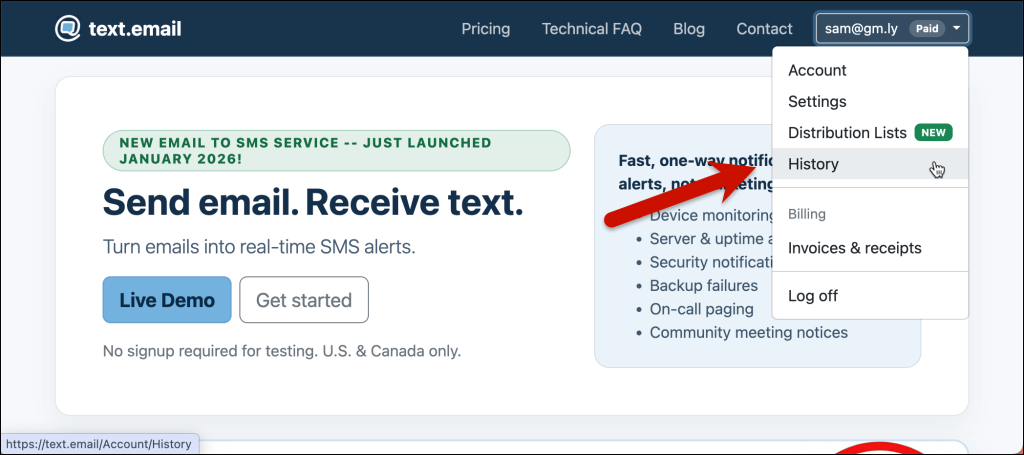
On that screen, you’ll see a box requiring your passphrase in order to see your encrypted messages.
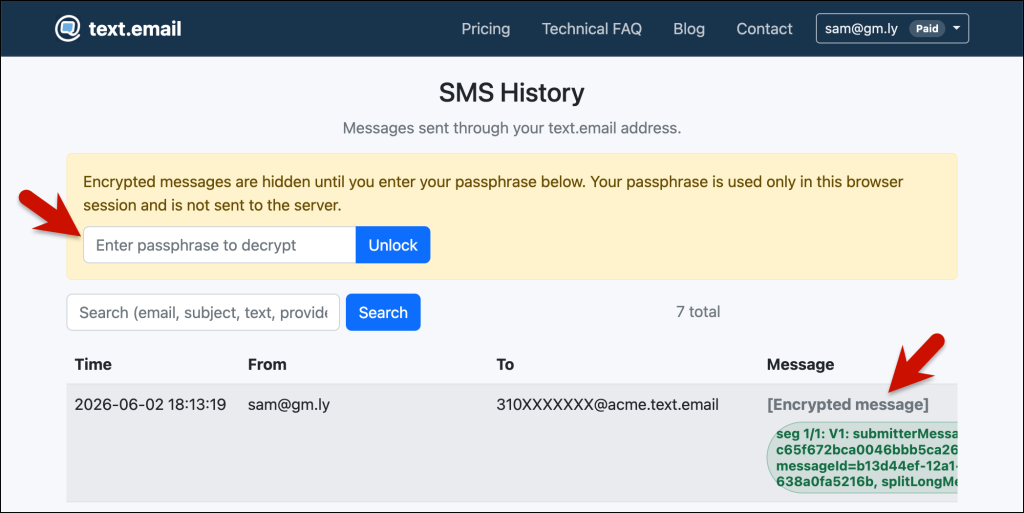
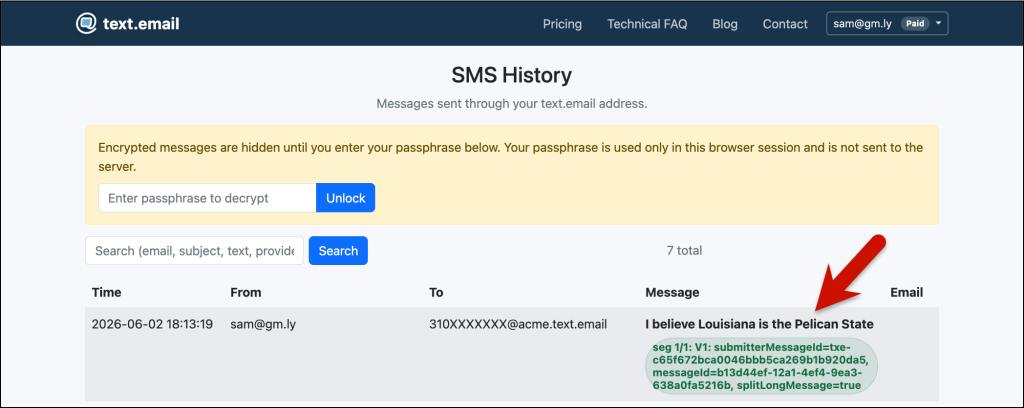
After I enter my passphrase above, I can now see my secret CIA extraction codeword. I mean, I can see whatever that message meant.
How Does Encryption Work?
When you enable Encryption, your SMS content is protected with a public/private key pair, and only you ever see the private key.
Here’s what makes this secure:
- Client-side encryption: Your key pair is generated in your browser. Your passphrase never leaves your browser; only your public key is sent to us, and that’s the only key we store.
- Database storage: Only the encrypted text is stored in your message history in our database. Without your passphrase, encrypted reports cannot be read.
- Decryption on demand: When you visit your SMS History page, you can decrypt messages using your passphrase.
- Key management: To change your passphrase, disable encryption and re-enable it with a new one. Messages encrypted with your previous passphrase are still decryptable as long as you have that old passphrase.
What about original emails?
When you enable encryption, we do not store the original email that triggered the SMS. This is by design; it strengthens your security by ensuring we don’t retain unencrypted versions of the data.
On your SMS History page, encrypted entries will not have a “show email” link available, since we don’t retain that information.
If you disable encryption later, future SMS messages will be stored with their original emails as usual.
Technical details for security-conscious users
For those interested in the cryptographic specifics, here’s how the system works under the hood:
- Key derivation: Your passphrase is processed through PBKDF2 (Password-Based Key Derivation Function 2) with a high iteration count to derive an encryption key. This makes brute-force attacks computationally expensive, even if an attacker somehow obtained your encrypted data.
- Encryption algorithm: SMS content is encrypted using AES-256 in GCM (Galois/Counter Mode). AES-256 is a symmetric encryption standard, and GCM mode provides both confidentiality and authenticity, preventing tampering with encrypted data.
- Client-side processing: All cryptographic operations occur in your browser using industry-standard JavaScript cryptography libraries. Your passphrase never leaves your device, and the encryption keys are generated locally without ever being transmitted to our servers.
- No private keys on our servers: We never have your private key or passphrase. We store your public key and the ciphertext (the encrypted blob) — and we don’t store anything that can decrypt it. Decryption always happens in your browser with your passphrase.
- Key rotation: To change your passphrase, disable encryption and then re-enable it. You’ll be able to set a new passphrase, which generates a new key pair. We retain your previous public key, and you can still decrypt older messages with your old passphrase. New messages are encrypted with your new key.
- No master keys: text.email does not maintain master encryption keys that could decrypt all user data. This architectural choice means that even with full access to our systems, encrypted reports cannot be decrypted without your passphrase.
Limitation: Mobile provider logs
⚠️ Please note: While text.email encryption protects your messages from us and our staff, major mobile providers (AT&T, Verizon, T-Mobile, etc.) typically maintain their own logs of text messages, and those logs are readable to them and potentially law enforcement.
Encryption on text.email only prevents text.email from reading your SMS reports; it does not prevent your mobile carrier from seeing the content of messages sent to your phone. If you’re sending extremely sensitive data that you want hidden from all parties, encryption at the text.email level may not be sufficient for your security needs.
Ready to Get Started with SMS Encryption?
Encryption provides several important security advantages:
- Data privacy at text.email: Even if our database is compromised, encrypted reports remain unreadable without the correct passphrase. No one on our team can access your encrypted messages.
- Compliance: If you handle regulated data (healthcare, finance, PII), encryption helps you meet security and compliance requirements.
- You hold the keys: You maintain full control over your encryption keys and data.
Who can use Encryption?
Encryption is currently available to trusted and paid users. Head to your account Settings to get started.
If you believe you should have access to this feature, please contact us.
And while you could use it for every message, if you lose your passphrase, you won’t be able to access your message history. So we recommend using this only when you’re sending truly private information.
Getting set up with text.email
Want to start sending email to SMS — and sending those messages with the encryption you’re after?
Just sign up for a plan at text.email and you’ll be sending alerts in minutes.
You can also try out text.email right now, with no signup or credit card required, by sending an email to your-number@text.email. You can’t use encryption during that trial, but you can see how easy it is to go from an email to getting an immediate text on your phone.
Send an email to
your-number@text.email
and receive it as a text in seconds. No signup required.