
Authorized Senders: Lock Down Who Can Send to Your text.email Address
It’s pretty tough for someone to send unauthorized email to SMS messages to you through your text.email address.
We have our private subdomain system which makes it tricky (if not virtually impossible) for someone to guess your text.email address. (Five-second refresher: Your text.email address is your-number@your-subdomain.text.email. You pick that subdomain to keep your address secure and secret.)
But… over time, your address winds up in various system configs, tickets, logs, and more. Which means it’s gonna be out there in the universe, at least a little.
So if you want some extra protection in case your subdomain gets out (whether it’s to a bad actor or beyond), text.email now offers an optional Authorized Senders feature.
(Yes, optional. If you never set this up, nothing about your account will change.)
Authorized Senders: Table of Contents
- How to Set Up Authorized Senders in text.email
- What Happens When an Unauthorized Sender Tries to Send You a Message?
- Ready to Get Going with Authorized Senders?
How to Set Up Authorized Senders in text.email
Here’s how to set up your authorized senders.
Step 1: Figure out every system that’s emailing you
Take a quick inventory of all the systems that are sending you SMS alerts. These could include:
- Monitoring and uptime services
- Controller software
- Access control and security panels
- Servers and network equipment
- Database Mail out of SQL Server
- Website contact forms
- Cameras, smart-home devices, voicemail systems
- SaaS tools that send operational notices
- Gmail or Outlook forwarding rules
Open a recent alert email from each one and check the From address. Plenty of platforms send alarms from one address and account notices from another, and that only turns up in a real message.
It’s worth taking the five minutes to do this first step to make sure you’re authorizing all the addresses and domains that message you.
Step 2: Set up your senders in the text.email settings
Head to the text.email settings for your account. Scroll down to the Authorized Senders section.
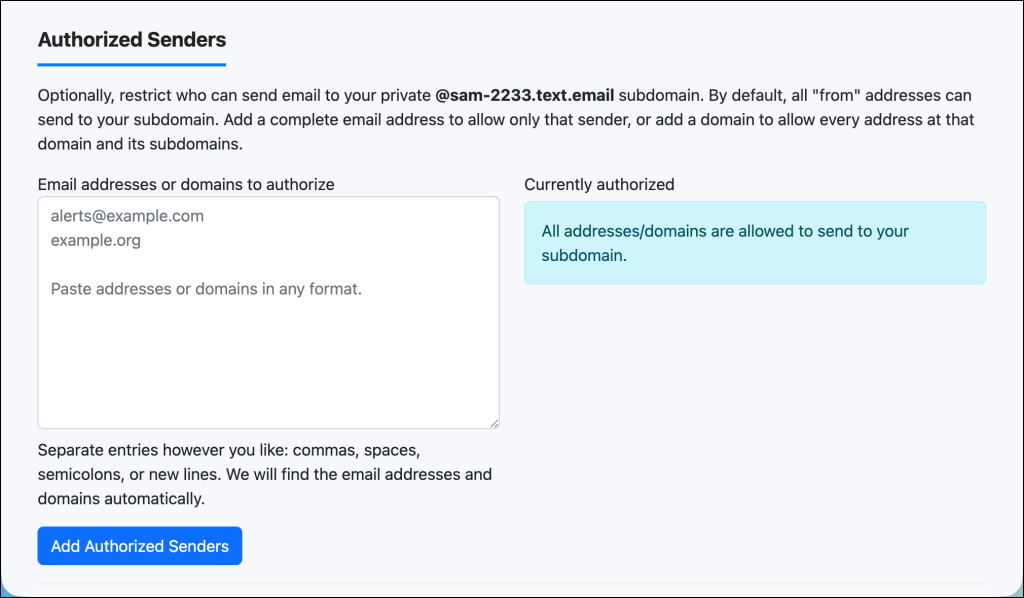
And there, you can enter individual email addresses, entire domains, or both.
For example, you could authorize:
alerts@example.commonitoring@example.com
Or you could just authorize the whole example.com domain, so any email from any address at that domain will be able to send to you (e.g., alerts@example.com, notices@example.com, server@monitoring.example.com, and beyond).
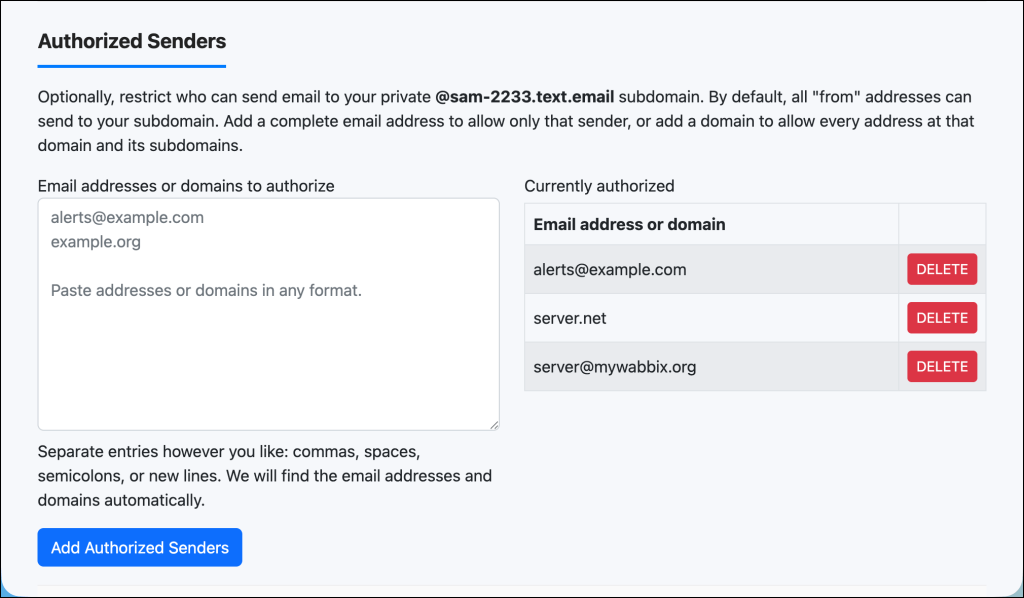
A few other notes:
- You can authorize individual emails and domains, you’re not limited to one or the other.
- Matching is not case-sensitive.
- You can enter the emails and domains in several different formats (separated by commas, spaces, semicolons, or new lines). text.email will detect the valid addresses and domains.
Once you add at least one authorized sender, restriction is live on your account. Every email sent to your private text.email subdomain must come from one of the addresses or domains on your list.
The restriction applies to the visible From address in the email, not the underlying SMTP return address sometimes used for bounces and delivery handling.
Step 3 (recommended): Test this out
Since you’re now restricting who can send to your text.email address, it’s worth testing this out.
If possible, initiate a test alert from all of your systems to make sure everything is still going through.
How to remove all restrictions
Want to get your account back to its original, unrestricted behavior?
Just delete every entry from the Authorized Senders list.
When the list is empty, the Settings page will show: All addresses/domains are allowed to send to your subdomain.
What Happens When an Unauthorized Sender Tries to Send You a Message?
If an email’s From address does not match anything on your Authorized Senders list, text.email will not send the SMS.
Two things happen:
The original email bounces. The sending system receives a delivery failure indicating that the email was rejected because its From address is not authorized for that text.email account.
You (or whoever owns the account) will get a notification. text.email periodically sends an email about rejected attempts to the account owner. It includes the rejected From address and the private text.email address it attempted to use.
This bounce + notification pair lets automated systems detect the failure through the bounce while also making sure that the account owner knows legitimate alerts may not be getting through.
Ready to Get Going with Authorized Senders?
So, again, you don’t necessarily need to use authorized senders with text.email. If you’re pretty sure the private subdomain system provides enough protection for your use, then adding authorized senders is overkill.
But if your text.email address is sitting in multiple configs — especially on systems that other people can access — then it’s probably worth the time to lock down who can send you messages.
The whole process is quick and reversible, so not a big loss if you ultimately change your mind.
If you’re a text.email subscriber, authorized senders are already live in your account. Just go to your text.email settings page to get them rolling.
And if you’re not a text.email user yet, authorized senders is just one of our great security features (you’ll also probably like our SMS encryption).
You can try out text.email for free, with no signup required. Just send an email to your-number@text.email and watch it come through to your phone as a SMS message moments later.
Send an email to
your-number@text.email
and receive it as a text in seconds. No signup required.