
How to Get Cloudflare Health Check Alerts as Text Messages
Cloudflare doesn’t send SMS. Not on Free, not on Pro, not on Business, not on Enterprise.
Welll… not natively, at least.
So if you want your Health Checks to start texting you when something goes wrong — as opposed to emailing you, since email notifications get buried too easily — you need a fix.
We’ve got one.
In this article, I’ll walk you through the easiest and quickest way to set up Cloudflare SMS alerts today. And by “today” I mean… in roughly the next five minutes.
Cloudflare Text Alerts: Table of Contents
- Setting Up Cloudflare Text Alerts (No Webhooks, No Code)
- Is This Really the Best Way to Get Cloudflare Text Alerts?
- Get Your Cloudflare Text Alerts Running in the Next Five Minutes
- Which Cloudflare Alerts Deserve a Text?
- Time to Get Started with Cloudflare Text Alerts
Setting Up Cloudflare Text Alerts (No Webhooks, No Code)
We’re going to use email-to-text to pull this off.
Importantly, nothing about your Health Checks changes here. Everything stays the same: the regions you’re probing, the intervals, the expected response codes.
The only thing you’re touching is where one alert lands. Right now it lands in your email inbox. We’re going to get it into your texts.
Step 1: Get an email-to-text address
The tool that bridges the “email to SMS” gap is text.email. You send a message to your unique address, it comes to you as a text.
When you sign up you’ll get your address, which will be your-number@your-subdomain.text.email. (The private subdomain is what keeps random people from being able to send you email-to-text messages.)
Copy your address and then we can move on.
Step 2: Open the Health Checks notification
Cloudflare’s notifications are at the account level, not inside any single zone. And I know, Health Checks themselves are configured per zone, so this is weird. But we’ll work with it.
Go into your Account, then into the Notifications section.
You’re looking for the Health Checks Status Notification (that’s what fires when there’s a state change).
Step 3: Add your email-to-text address
Open the notification and find the Notification email field.
You can just drop in your text.email address. You don’t have to configure an SMTP server or make any other changes.
You get up to 20 recipients on a single notification, so you don’t have to choose between your phone and your inbox. Keep the email copy for the record and add the text address alongside it.
Step 4: If you run Load Balancing and want alerts from it, set that up too
Cloudflare’s standalone Health Checks and Load Balancing health monitoring are two different types of notifications.
The Load Balancing Health Alerts lives at the same account level as the Health Checks Status Notifications.
And it’s the same deal: Same recipient field, same approach, you just edit a different policy.
Step 5: Use SMS formatting to make sure the important info is delivered
Cloudflare’s notifications give you a lot of information. Which is fine for email, but isn’t great for text.
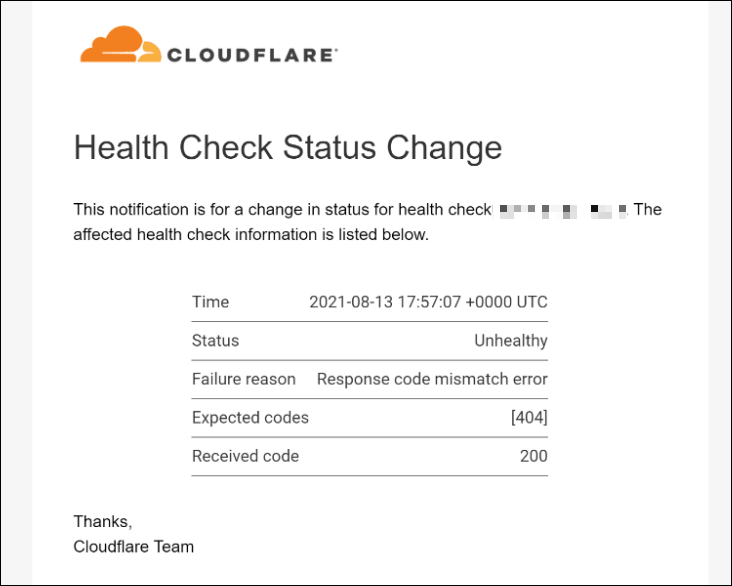
You can use text.email’s SMS formatting to pull out the relevant information (for instance, status and failure reasons).
If you don’t, the text will still likely be fine, but you’ll get a cleaner at-a-glance view if you use formatting.
Is This Really the Best Way to Get Cloudflare Text Alerts?
Email-to-text is the path of least resistance, but it isn’t the only path.
Here are the alternatives (along with why the email-to-text route is a better way to get the alerts you’re after).
Cloudflare’s webhooks
Cloudflare can fire a webhook on a Health Check change.
But, of course, a webhook doesn’t text anyone. So get a webhook to text your phone you’d be wiring up something like Zapier or Make in the middle, then Twilio on the far end to actually send the SMS.
So now you own a chain… where the failures are the quiet kind (nothing like missing that one critical alert because a connector silently expired a few days earlier).
There’s another wrinkle too, and you likely have no idea about this one. Sending automated texts requires something called A2P 10DLC. That’s a relatively new carrier registration process for application-to-person messaging.
It’s a lot of paperwork and overhead. But without it, your texts will (again) silently fail.
All in all… it’s a lot of moving parts just for “text me when the origin’s down.”
Cloudflare’s PagerDuty integration
PagerDuty is a native Cloudflare integration. If you already run PagerDuty, by all means route Health Checks into it; you’ve got the on-call schedules and escalation policies and it’ll do exactly what you’d expect.
But if you just want texts, signing up with a full-featured paging platform is an expensive and complicated route to get them.
Doesn’t my cell phone plan come with email to text?
Somewhere in the recesses of your brain do you vaguely remember that you could send email-to-text through your cell phone carrier?
Yes. You used to be able to do that.
Every carrier offered the service with addresses like yournumber@txt.att.net or yournumber@vtext.com that turned an email into a text. It was part of your paid phone plan, whether you used it or not.
Well… that technique is pretty much dead.
AT&T shut its gateway down in June 2025. T-Mobile‘s stopped resolving back in late 2024, no announcement, it just quietly stopped working. Verizon‘s is still limping along but on its way out; they’re winding it down toward early 2027, and it’s already unreliable enough that a meaningful share of messages fail silently before then.
Why are they dead? It’s connected to that whole A2P 10DLC thing I covered earlier.
Those old gateways didn’t have any sender authentication so they were eventually overrun with spam and phishing. Plus, there’s no way to make them compliant with the regulations that are now in force.
So the address you’d have used five years ago either bounces or, worse, swallows the message without telling you.
That’s why text.email exists. It’s the same “put an address in the field” simplicity the carrier gateways had, except it routes your texts through properly registered channels, so the message actually arrives.
Get Your Cloudflare Text Alerts Running in the Next Five Minutes
You’re really three moves away from getting your Cloudflare health check text alerts:
- Grab your text.email address.
- Open the Health Checks Status Notification and/or the Load Balancing Health Alerts in your Cloudflare account.
- Add your email to SMS address to the Notification email field (it’s a plain recipient field, nothing else to configure).
Want to test this out first? You can. text.email offers a no-signup-required trial. So on the list above, skip step one. Just go to your Cloudflare notifications and enter your-number@text.email. Run a test, and you’ll see the message delivered right to your phone.
Which Cloudflare Alerts Deserve a Text?
You can let emails pile up; it’s inherent to that medium. Texts? We still check those.
That’s a double-edged sword, though. Yes, it makes text alerts more effective than email ones. But… if you route everything to SMS, you’ll start ignoring SMS, and then the whole effect is lost.
So… we need to be choosy about what earns the interruption.
Here’s a rough jumping off point for you, though, of course, your needs will vary.
Worth a text:
- An origin or endpoint going Unhealthy. Obviously.
- A Load Balancing pool or origin dropping out.
- A big platform event like an HTTP DDoS alert, if you’ve configured those. These are the very rare but very real crises.
Fine to leave on email:
- The “back to Healthy” recovery notice.
- Usage and billing alerts.
- Maintenance notices and incident FYIs.
One setting does most of this work for you: when you pick the notification trigger, set it to Unhealthy rather than Either.
Time to Get Started with Cloudflare Text Alerts
Cloudflare is already doing the hard part: The probing, the regional logic, the deciding when an origin has actually gone unhealthy versus just hiccuped. All that’s running, and it’s the part that’s genuinely difficult to get right.
You just need something to do a better job grabbing your attention.
So close that gap: grab a text.email address with your private subdomain, open the Health Checks Status Notification, and drop the address into the recipient field.
The next time an origin goes down, you’ll know from your pocket.
Send an email to
your-number@text.email
and receive it as a text in seconds. No signup required.