
How to Text Without Cell Service Using Your Email (No New Apps Required)
If you live somewhere rural, you know the deal when it comes to trying to text without service: you’ve got internet that works fine, but cell signal at the house is one bar on a good day, or nothing at all.
And that’s not only a rural life problem. The same thing happens in a basement apartment, or inside a building where the signal can’t punch through, or any of the other spots that have wifi but no cell service.
Your texts just won’t go through.
And yeah, there are some answers (from iMessage and WhatsApp to, I don’t know, two tin cans and a very long piece of string).
But sometimes you just need to text without everyone having extra apps.
And now you can.
You can now text any phone using nothing but email — zero new apps required. Then when the person texts back, their reply lands right in your email inbox, and you answer from there to keep the conversation going.
Here’s how to set it up.
Text Without Service: Table of Contents
- How to Text Without Service Using Only Your Email
- What About the Other Ways to Text Without Service?
- Texting Without Service, Straight From Your Inbox
- Who This Helps Most: Rural Homes, Boats, RVs, and Dead Zones
- Texting Without Service: FAQ
- Ready to Start Texting Without Service?
How to Text Without Service Using Only Your Email
Let’s get this set up
Step 1: Sign up for text.email
We’re going to use text.email, which is an email to SMS service with two-way email-text messaging.
Head to text.email and create an account. You’ll get a special email address, something like any-number@your-subdomain.text.email.
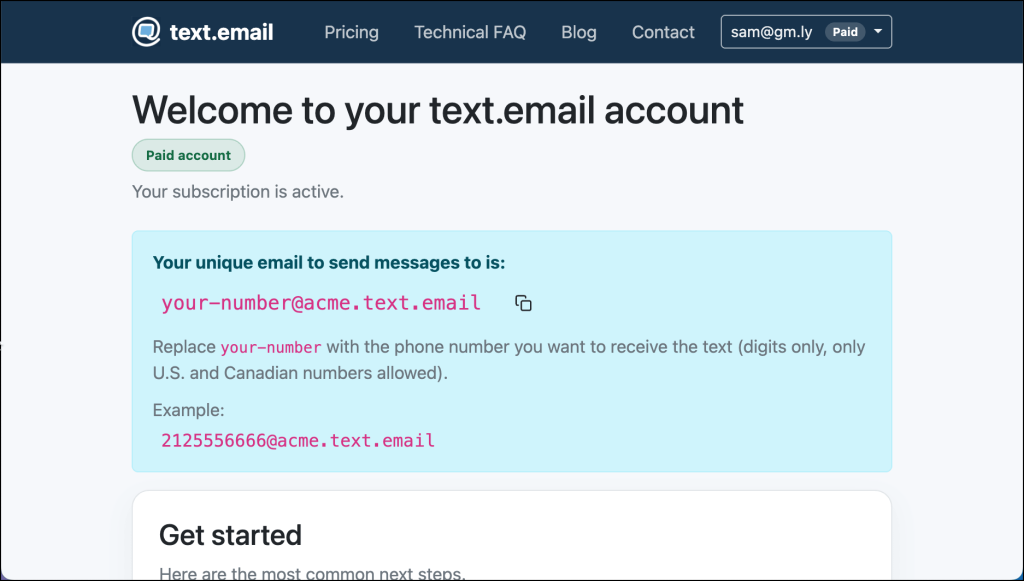
Importantly, no phone number is required for you to register. I’ve never understood the services made for people without cell service that require you to text or call.
Step 2: Send a text by emailing the number
You can put any friend or family member’s phone number in your text.email address, and the email you send will be delivered to them as a text.
For example, let’s say you want to text Russ at 555-123-4567. You’ll do that by sending an email to 5551234567@your-subdomain.text.email.
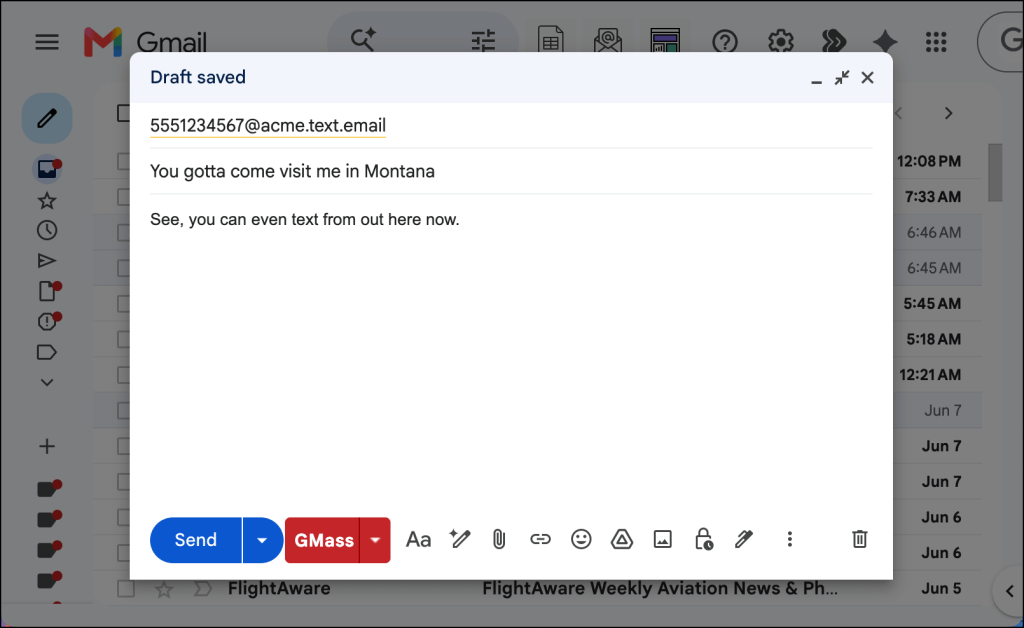
Whatever you write in the email shows up as the text on their phone.
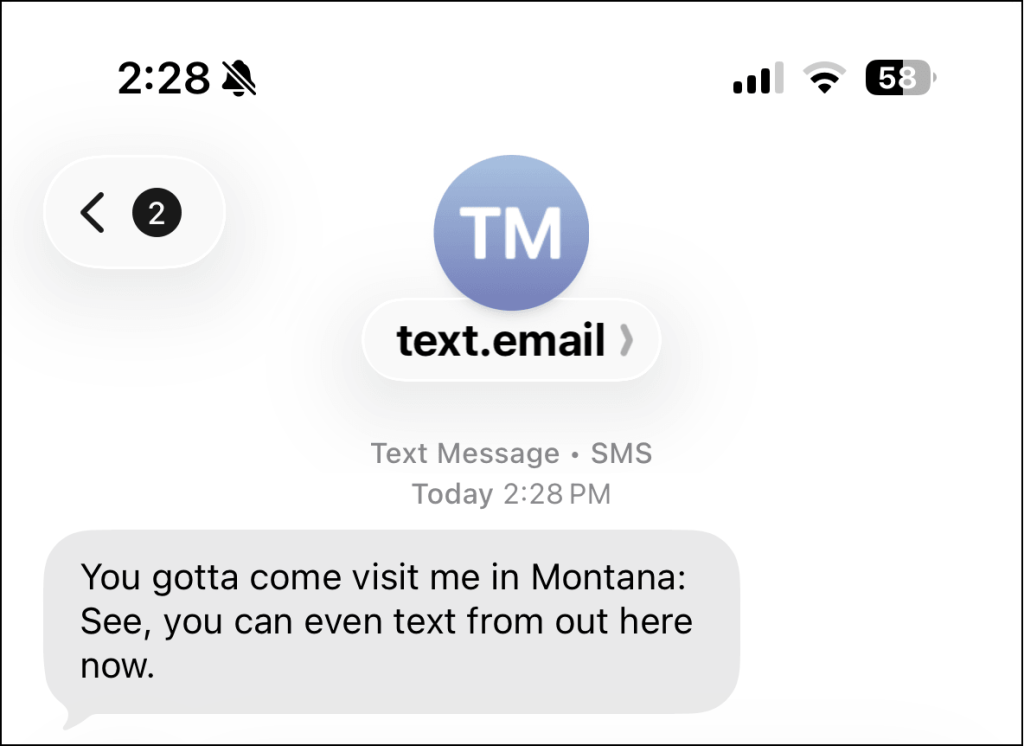
And you’re doing this from the mail app that’s already on your phone or computer (meaning, again, that there’s nothing new to download and no new software to learn).
Step 3: When they reply, the message comes back to your inbox
When they reply, their text comes back to you as an email from a text.email address.
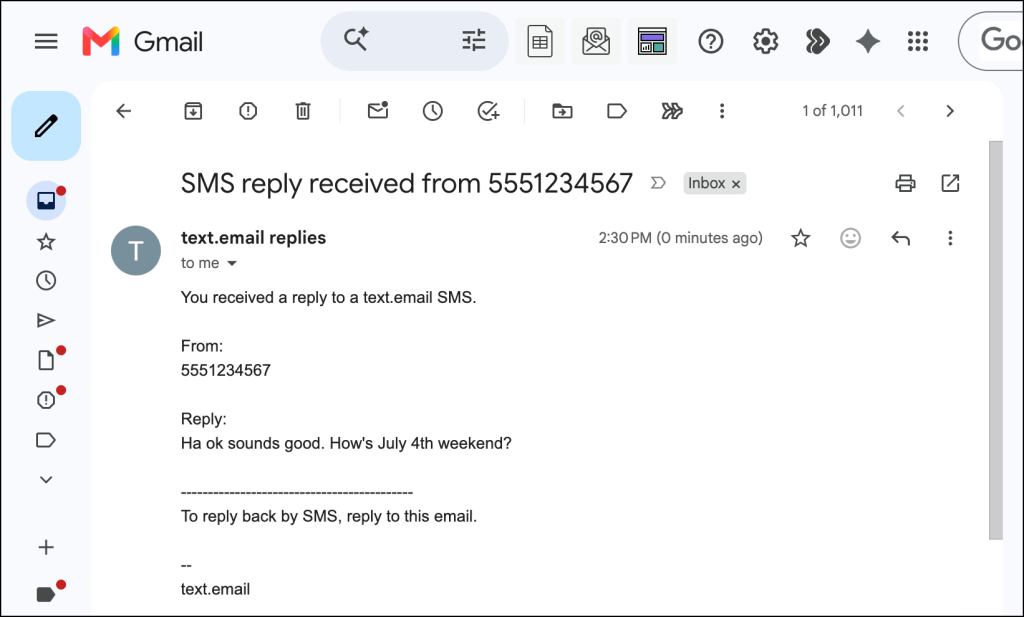
The subject line has their phone number in it, so you can see at a glance who answered.
Step 4: Reply to that email to keep texting
Want to write back? Reply to that email like any other, and it goes out to them as a text.
So that’s the flow:
- You send email → they get SMS
- They reply by SMS → you get email
- You reply to email → they get SMS
- Repeat indefinitely
Important: For whitelisted text.email users only
Two-way messaging is open to all text.email users who are whitelisted and provisioned.
Your account will be automatically classified based on your sending, and you can tell when you’re whitelisted if your text.email messages come from an 888 phone number.
If your messages aren’t coming from the 888 number, you can reach out to support to ask us to look into your account.
What About the Other Ways to Text Without Service?
text.email has some advantages over the other ways people text without service (as I’ll get into throughout this section) — but it isn’t the only way to communicate when you’re in a rough cell area.
Google Voice
Google Voice is the most popular alternative. You can sign up, get a phone number, and send texts over wifi without a cell service.
There are two catches that make the text.email option a bit more appealing.
First, to sign up, Google makes you verify with an existing mobile number that can receive a text. That can be the exact thing you don’t have out where there’s no service.
And second, you’ll need to use a separate app (and website) and new number to send and receive your texts. The text.email option works with the email address in the email app you’re already checking.
Dedicated messaging apps
iMessage, WhatsApp, and Signal all work over wifi too. The limit is that they only reach other people on the same app, so, again, this is another app.
Satellite texting
Satellite texting on newer iPhones and Androids can get a message out when you’re truly off the grid. But it’s built for emergencies. It’s slow, finicky, and not meant for a real conversation.
Texting Without Service, Straight From Your Inbox
The email-to-SMS-back-to-email method in this article is the quickest and easiest way to get going on texting when you don’t have cell service.
For you, it’s as easy as sending and replying to emails; for your contacts, it’s just like regular texting.
You don’t install an app or set up a number. The mail app on your phone does it, and so does your laptop or tablet if that’s what’s nearby.
It’s two-way and it reaches any phone.
To get started, sign up at text.email and you can be texting in a couple of minutes.
Who This Helps Most: Rural Homes, Boats, RVs, and Dead Zones
Here are a few situations where this email-to-text method makes a lot of sense:
- A rural home where the internet works but cell coverage never showed up
- A boat, RV, or remote cabin running on satellite or marina wifi
- Traveling without a local plan, when all you’ve got is hotel or cafe wifi
- A spare phone with no SIM from which you still want to send texts
- A basement apartment
- A metal building or any place that’s like a Faraday cage
- Anywhere you spend a lot of time that’s a cell service dead zone
If one of those is you, the setup above is all you need.
Texting Without Service: FAQ
Can I text over wifi?
Yes. To send a text to any phone while you’re on wifi (and don’t have a cell signal), you can use text.email. You send an email, it goes to your contact as a text message. They reply to the text, and it comes back to you as an email.
Can I text without a phone number?
Yes. You don’t need a phone number to send actual SMS messages. With text.email, which is an email-to-SMS service, you send an email and it goes through as a text.
Can I text without a SIM card?
Normally, you can’t send SMS messages without a SIM card. However, using an email-to-SMS service like text.email, you can send an email which is turned into a text.
Does the person I’m texting need text.email too?
No. They get a normal text on their normal phone and reply the way they always do. There’s nothing for them to install.
Can I receive SMS over wifi?
You can’t receive actual SMS messages over wifi. So if you want to have a text message exchange with someone, you need a workaround. With text.email, you send an email and it goes to your contact as a text. They reply to the text, and it comes to you as an email.
Ready to Start Texting Without Service?
So this is all it takes to send texts when you don’t have cell service (whether you’re in a rural area, metal building, or wherever).
- Sign up for text.email
- Send an email to your contact using your new text.email address
- They receive it as a text
- When they reply to the text, it goes to you as an email
- Reply to that email, it goes to your contact as a text
- Repeat
Sign up at text.email and send your first email to SMS message in the next couple of minutes.
Send an email to
your-number@text.email
and receive it as a text in seconds. No signup required.