
How to Get TradingView Text Alerts Using Email-to-Text
TradingView watches the charts for you, and it can even send you real-time notifications on different events.
Your options are:
- App notifications
- Website pop-ups
- Webhooks
- Playing a sound
- And sending an email.
Notice what’s missing? The one type of notification you never miss.
So in this article, I’m going to show you how to get the TradingView text message alerts you’re after.
And it doesn’t require any integrations, or APIs, or even any technical work (or skill) at all.
We’ll point TradingView’s email-to-SMS option at a forwarding address that turns the email into an actual SMS on your phone. And we’ll do it in about five minutes flat.
TradingView Text Alerts: Table of Contents
- Setting Up TradingView Text Alerts in About Five Minutes
- Is This Really the Only Way to Get SMS Alerts from TradingView?
- Get Your TradingView Text Alerts Live Today
- Which TradingView Alerts Actually Deserve a Text?
- Start Getting TradingView Text Alerts on Your Phone
Setting Up TradingView Text Alerts in About Five Minutes
Here’s the playbook: We’re going to grab a forwarding address that turns email into SMS, register it as an alternative email inside your TradingView account, and then tick the right checkbox when you create an alert.
Step 1: Get a text.email address for email-to-SMS
Head over to text.email (which is the quickest email-to-SMS service available) and sign up. You’ll get your own email-to-text address that’s something like your-number@your-subdomain.text.email.
When an email lands at that address, text.email turns it into a text message and sends it to your phone.
Copy your address so you have it as we head to TradingView next.
Step 2: Add your email-to-text address to TradingView’s Alerts delivery settings
TradingView keeps your alert email destinations in account settings, separate from the alert itself. So before you can use the new address, you need to register it.
In TradingView, click your avatar in the top right and go to Settings and billing → Alerts delivery. There’s an Add email button.
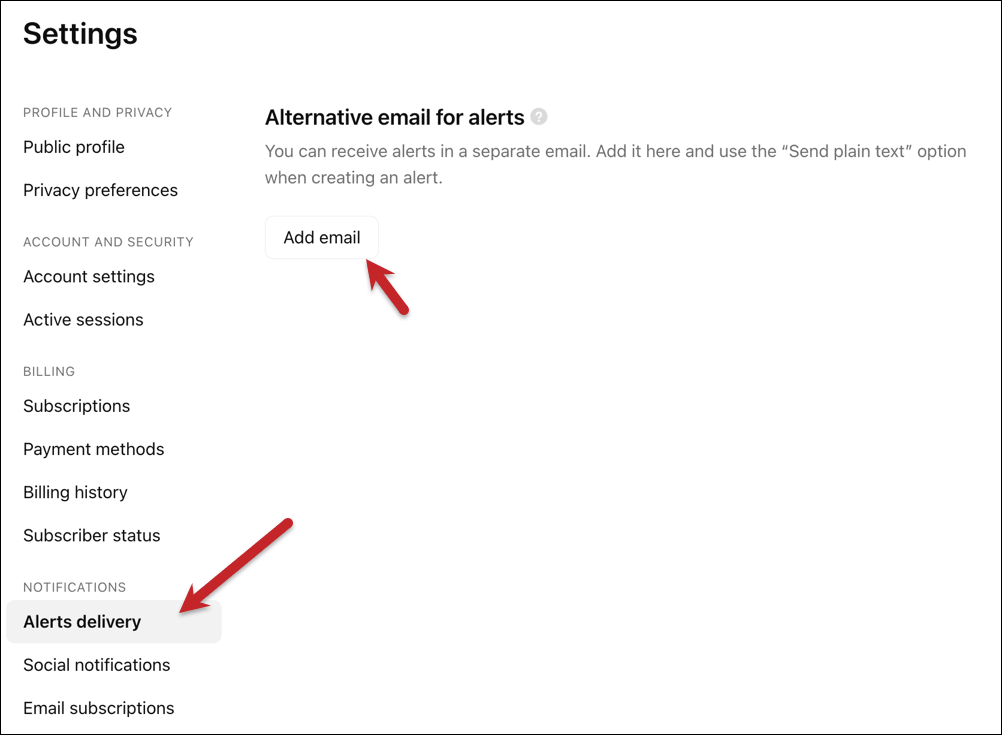
Click it, paste in your text.email forwarding address, and submit.
TradingView will fire off a verification code to that address. text.email will forward it as a text, and the verification code will arrive on your phone as an SMS. (Which is its own little proof-of-concept moment.)
Step 3: Set up the alerts to send emails (to your email-to-text address)
Open any alert (existing or new) using the bell icon, right-click on the chart, and scroll to the Notifications section.
You’re looking for a checkbox labeled Send Email.
Make sure your text.email address is selected as the destination (it should appear in the dropdown now that you’ve registered it). Save the alert.
You want to make sure you’re sending it as plain text only.
Step 4: Make the message read like an SMS
Emails are long. Texts are short.
Both TradingView and text.email offer ways to format your messages to make them more appropriate for text length.
TradingView’s guide is here (you might structure your messages like {{exchange}}:{{ticker}} {{interval}} — {{close}}).
And text.email’s SMS formatting can help you pull out even more fine-tuned info from there.
Is This Really the Only Way to Get SMS Alerts from TradingView?
That’s a fair question. While email-to-text works, it does feel a little like a hack or a work around.
So let’s dive into why it really is the best (and, maybe, only truly viable) method.
The cell phone carrier gateways are mostly dead
For the past quarter of a century, every major U.S. cell phone carrier offered email-to-text services. You’d email a special address tied to a phone number (like 5551234567@vtext.com), and the carrier would deliver it as a text.
TradingView’s own documentation still suggests using these.
Well… don’t:
- T-Mobile and Verizon explicitly restrict their gateways to “personal use only” and reserve the right to throttle or block messages they consider automated. And that’s if the messages even go through at all.
- AT&T explicitly stopped their email-to-text services.
There were a few reasons why they killed their gateways. One is they were overrun with spam. And two, new regulations (which I’ll get into momentarily) around applications sending text messages effectively killed off the services.
DIY with Twilio is more project than you wanted
The natural next thought is to wire up TradingView’s webhook option to a Twilio number and send your own SMS.
And yes, you could do that. But that’s another system to build and maintain (even vibe coding it is a project).
But beyond that, you’ll need to sign up for something called A2P 10DLC, which is the regulatory framework around application-to-person texting in the U.S. That’s a long, costly, and bureaucratic process.
There’s a lot of “reinventing the wheel” here to ultimately save a couple of dollars a month.
Get Your TradingView Text Alerts Live Today
Alright. You’ve got the process now, and the whole thing is about a five-minute setup.
Want to test out email-to-text first? You can even try this method without signing up for an account (no credit card or anything).
Just go into TradingView and put yournumber@text.email (so, like, 5551234567@text.email) in as an alert. You’ll get a free trial that way to see this system in action.
And when you’re ready to make this process official, the first step is heading to text.email to get your email-to-SMS address.
Which TradingView Alerts Actually Deserve a Text?
Once the pipe is open, the temptation is to text-ify everything.
But… with too many alerts, you’ll grow deaf to the texts and they’ll lose their value. So here’s a rough jumping off point for you to keep your texting levels “actionable only.”
Worth a text:
- Price level breaks on instruments you’re actively in or watching for entries
- Strategy alerts (Pine Script buy/sell, any plan)
- Multi-condition alerts (Plus plan and up)
- Watchlist alerts (Premium and Ultimate)
- Volume spikes on thin-float names
Leave on email or push:
- Indicator value changes that fire several times a session
- “Once Per Bar” alerts on lower timeframes
- Alerts on instruments you’re tracking long-term but not trading today
- Any alert where you’d want a chart to confirm before acting
A general rule: if the alert needs you to look at a chart before doing anything, email is fine. If the alert is the action signal itself, text it.
Start Getting TradingView Text Alerts on Your Phone
The TradingView side is already built for this. Sending emails has been sitting in the alert box the whole time, waiting for somewhere to send to. text.email is that somewhere.
Sign up at text.email, register your address under TradingView’s Alerts delivery, and check the box on your real alerts. And ideally, you won’t be late on a massive opportunity ever again.
Send an email to
your-number@text.email
and receive it as a text in seconds. No signup required.