
How to Get Text Alerts for Important Yahoo Mail Messages
It’s just too easy to miss important emails in Yahoo Mail the moment they arrive.
Yahoo’s mobile app will give you push notifications, sure. But those notifications stack up (I’m not telling you anything you don’t already know here).
Plus, email notifications tend to just be background noise. You don’t treat them with urgency, because most of the time they don’t deserve it.
Text messages are a different story. We all still read those.
Good news: You actually can turn your Yahoo Mail messages into text alerts. And I can show you how.
We’ll use email-to-text to keep it simple.
Well… sort of. With Gmail and Outlook, this takes about five minutes to set up. With Yahoo, there’s a catch.
In this article I’ll go over that catch… and how to work around it to set up email-to-text forwarding for some or all of your Yahoo Mail messages.
Yahoo Mail Text Alerts: Table of Contents
- What’s the Catch With Yahoo Mail Forwarding?
- Setting Up Yahoo Mail Text Alerts
- Yahoo Mail Text Alerts: Which Option Should You Pick?
What’s the Catch With Yahoo Mail Forwarding?
Up until January 2021, any Yahoo Mail user could set up auto-forwarding for free.
Then — and I’m just snarkily speculating here — Yahoo realized that way too many people were forwarding the messages from their old email account to one of the more popular modern platforms. And they were like, “Why would we help people do that for free?”
So Yahoo pulled the feature from free accounts and made it exclusive to Yahoo Mail Plus (which runs you about ~$5/month).
If you want Yahoo to automatically forward your incoming emails somewhere else — like Gmail… or to an email-to-text service — you need a paid plan.
But that’s not the only catch.
There’s no filtering on the forwarding
Remember my speculation that people are forwarding all their Yahoo Mail messages to a new platform? Yahoo’s forwarding setup kinda confirms it.
Because it doesn’t offer any filtering. You can’t say “only forward emails from this sender” or “only forward emails with [whatever] in the subject line.” It forwards everything or nothing.
Yahoo does have a Filters feature, but filters can only sort emails into folders.
This is fine if you’re forwarding all your messages to a new account. It’s less fine if you only want to forward urgent messages to your phone in the form of texts.
So we’ll need to use a bit of a Rube Goldberg’d workaround for that. Read on.
Setting Up Yahoo Mail Text Alerts
Alright. Even with the roadblocks they’re putting up we’re still going to push on with turning our Yahoo Mail messages into texts. Here’s the step-by-step guide.
Step 1: Subscribe to Yahoo Mail Plus
So there’s really no way around it. You need Yahoo Mail Plus ($5/month) to unlock forwarding.
The main reason we’re paying is the forwarding feature, but hey, since you’re clearly an active Yahoo Mail user you’ll also get a few other perks as well. (No ads, more storage, and a few other features on the margins. It’s not some kind of “must-have” upgrade unless you have a specific and direct need for it.)
Step 2: Get your email-to-text address
We’re going to use text.email for our email to SMS service. text.email is the quickest way to do this; you’ll just drop in your address without having to do any regulatory paperwork or configure a whole emergency alerting team platform.
Sign up, subscribe to a plan, and you’ll get a personal address (your-number@your-subdomain.text.email).
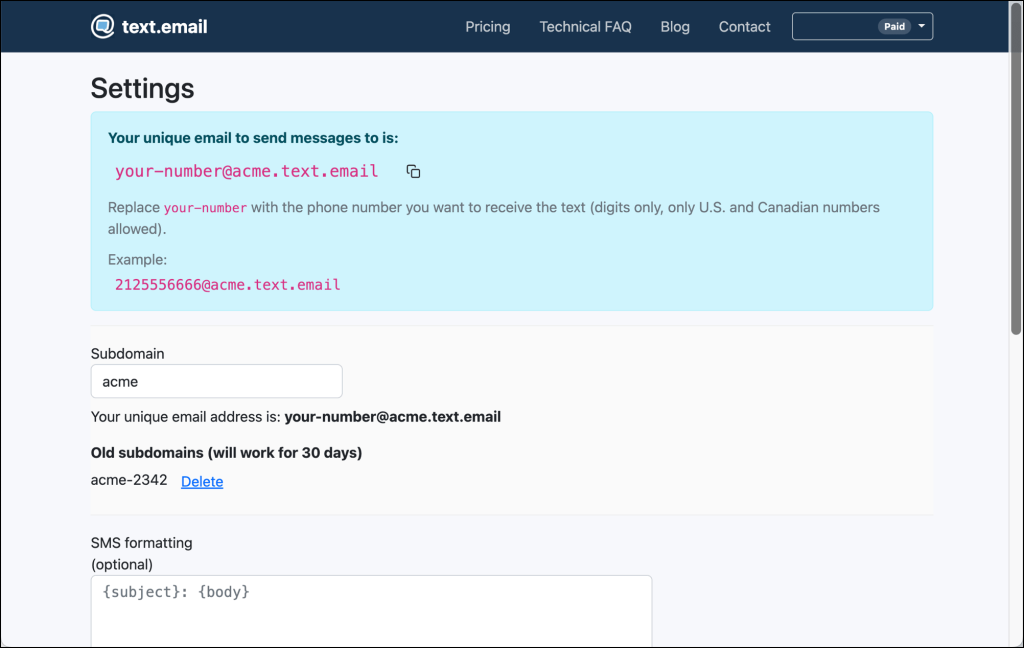
Any email sent to that address shows up on your phone as a text message.
Step 3 (aka Option 1): Forward all incoming Yahoo emails
If you want every Yahoo email to come through as a text alert, that’s a simpler setup. It makes sense if your Yahoo account is low-volume or dedicated to alerts. Otherwise, it really does NOT make sense to turn every single message into a text; you’ll grow blind to those too.
If you only want to forward select messages, skip to Option 2.
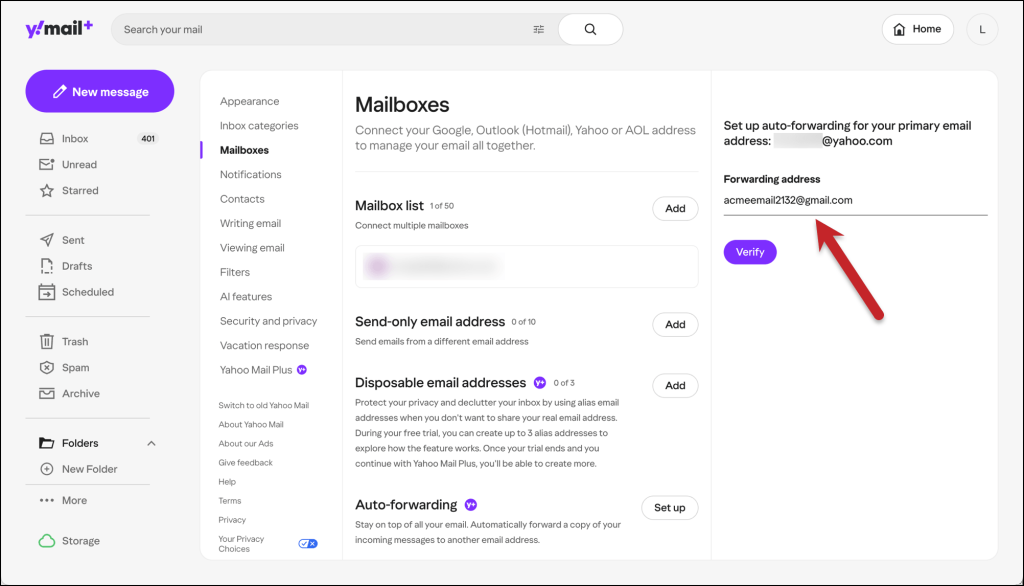
Go to your Yahoo Mail inbox in a browser (this is easier on desktop).
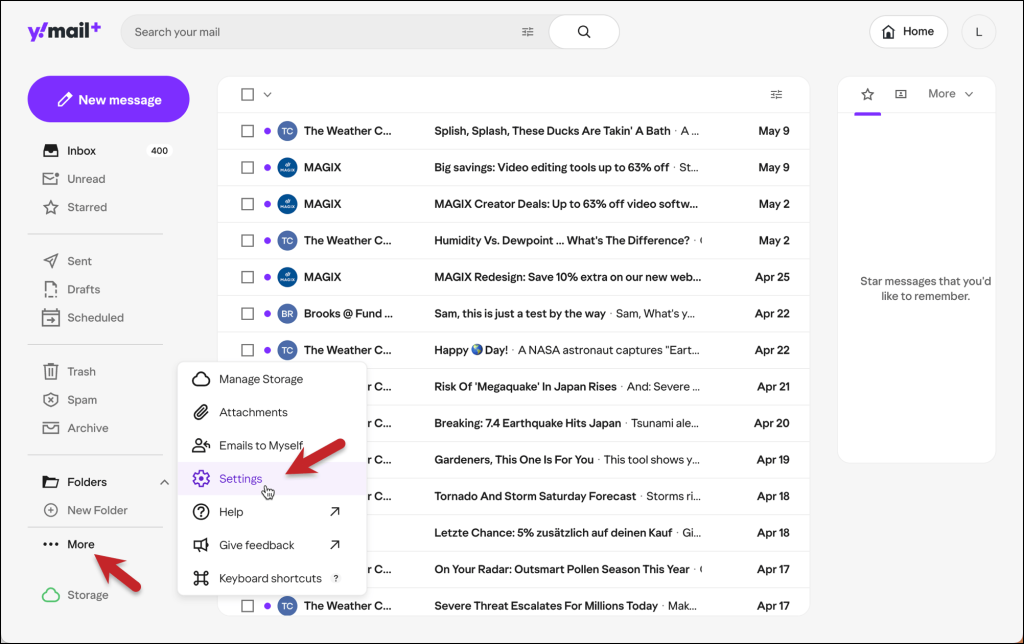
In the left sidebar, click the … More link, then click Settings.
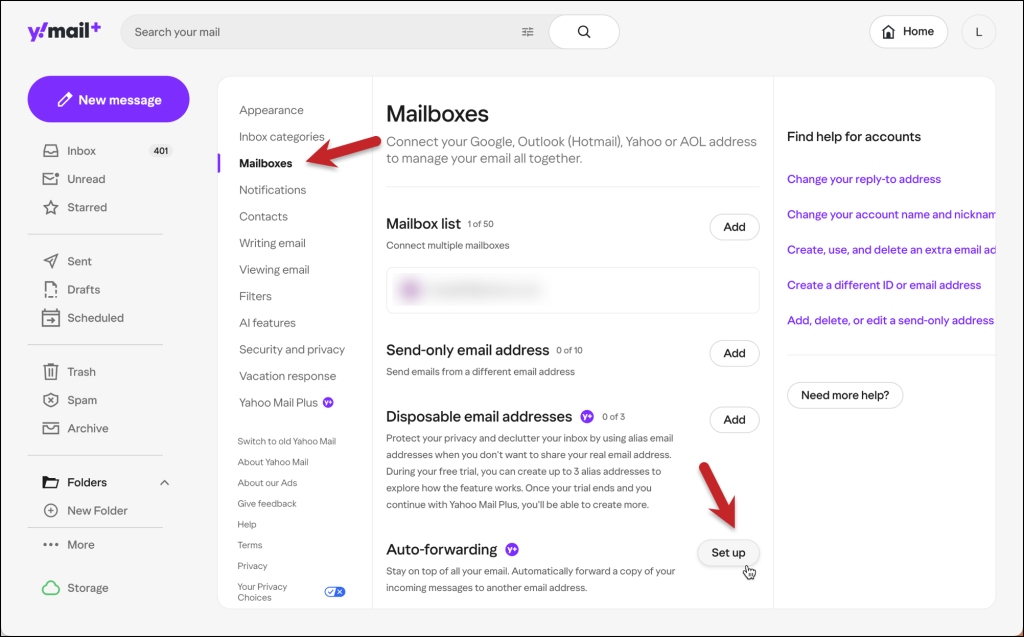
On the Settings screen, click Mailboxes. Then click the Set up button next to Auto-fowarding.
Put your text.email address down as the forwarding address.
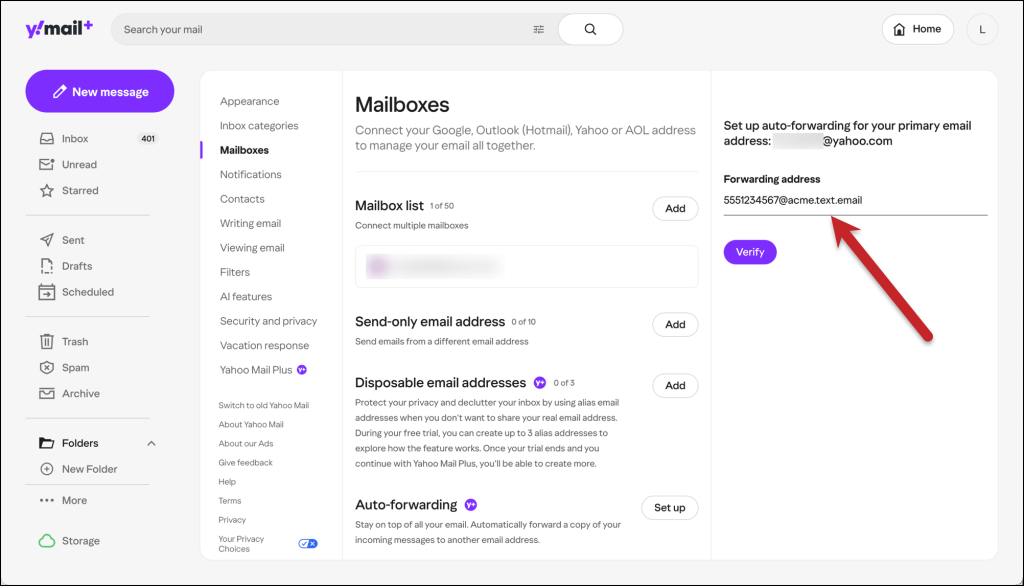
Yahoo will send a verification email to confirm the forwarding address. If you’re using text.email, that verification will arrive as a text on your phone with a confirmation link.
Click it to verify, then go back to Yahoo Mail settings and make sure forwarding is active.
And that’s it for the “forward everything” setup. Every email that hits your Yahoo inbox will now also arrive as an SMS.
But since that’s probably overkill…
Step 4 (aka Option 2): Forward only specific emails through Gmail or Outlook
If your Yahoo inbox gets a lot of email, you don’t want every single message becoming a text. That defeats the purpose.
Yahoo won’t let you selectively forward. But Gmail and Outlook both will.
So the (undeniably convoluted but necessary) workaround is to forward everything from Yahoo to a Gmail or Outlook account, then use their filters to forward only the emails that matter to your email-to-text address.
Yes, it’s an extra step. But it only takes a few minutes to set up and then it runs on its own.
The flow: Yahoo → Gmail (or Outlook) → text alert on your phone
First, set up Yahoo’s forwarding (same steps as Option 1), but instead of forwarding to your email-to-text address, forward to a Gmail or Outlook address.
Setting this up in Gmail
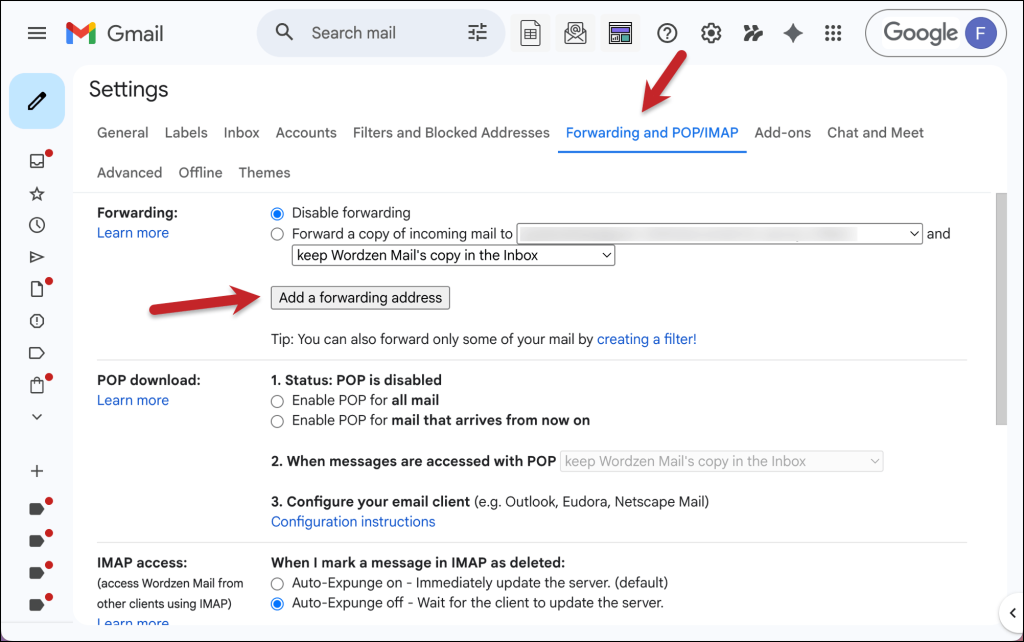
Gmail is a two-step process: You need to add your text.email address as a verified forwarding address, then create a filter to forward select messages to that address.
Go to Settings by clicking the gear icon in Gmail. Then click See all settings, then Forwarding an POP/IMAP.
Click the button to Add a forwarding address.
Type in your text.email address here.
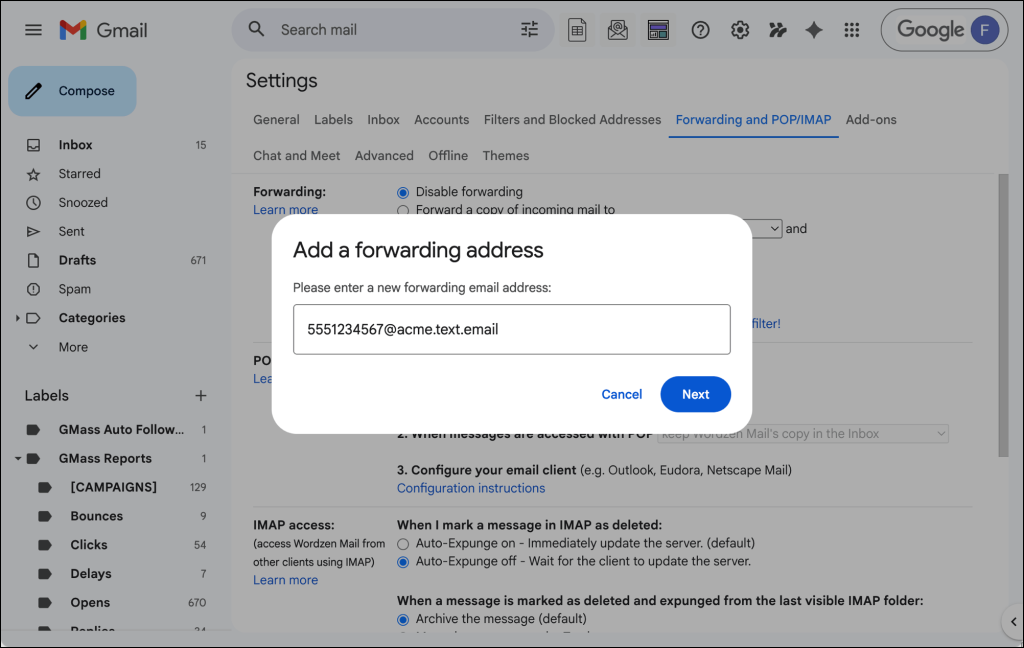
You’ll now have to confirm that address by clicking a link they send (which will come to you as a text message). Once that’s done, it’s time to set up a filter in that account:
Back in the Gmail settings, go to Filters and Blocked Addresses and then to Create a new filter.
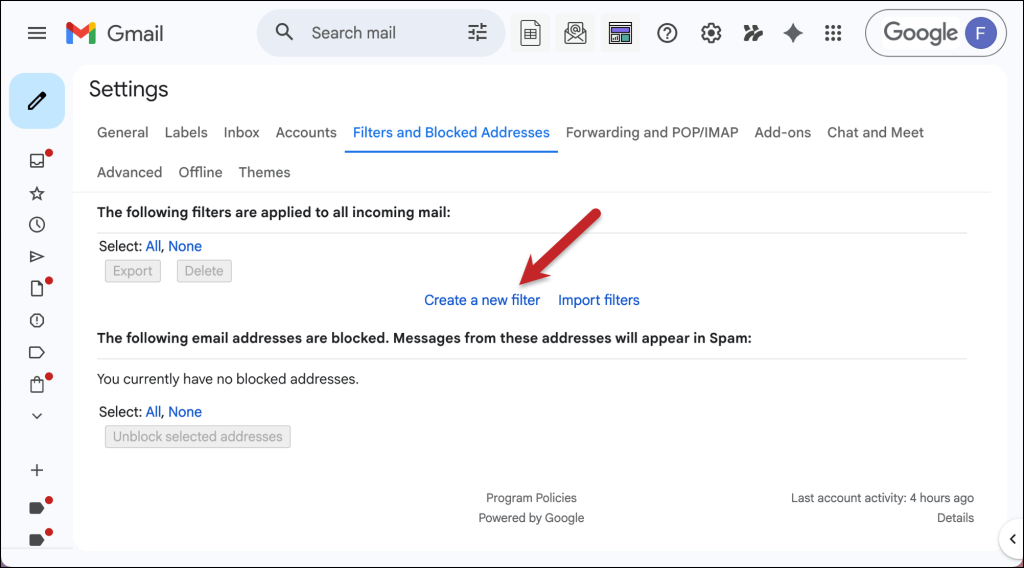
Set the criteria to match the emails you want as texts (emails from a specific sender, or with certain keywords in the subject line). For example, the one I did here matches keywords in a subject line.
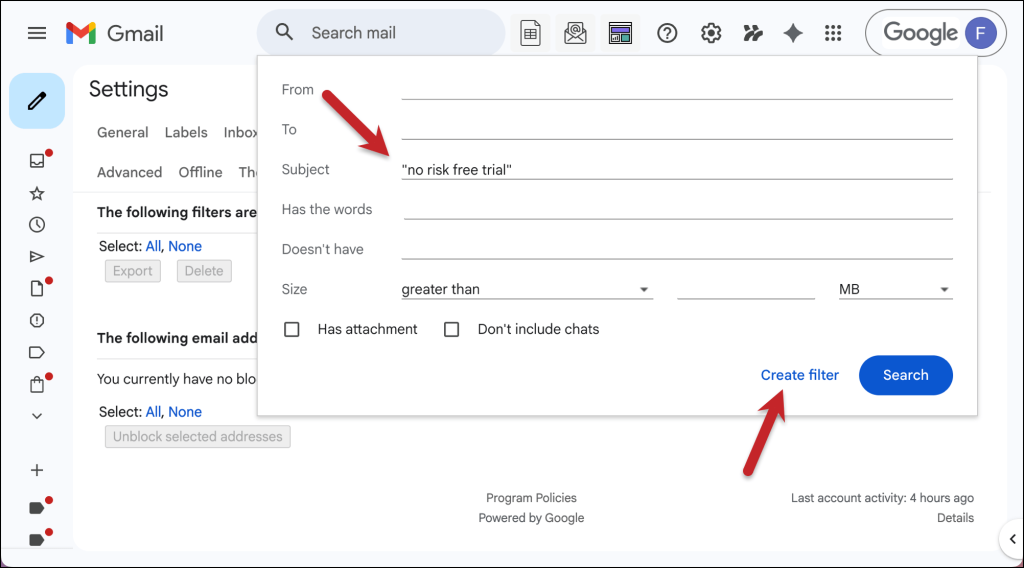
Then click Create filter.
On the next screen, click Forward it and choose your text.email address.
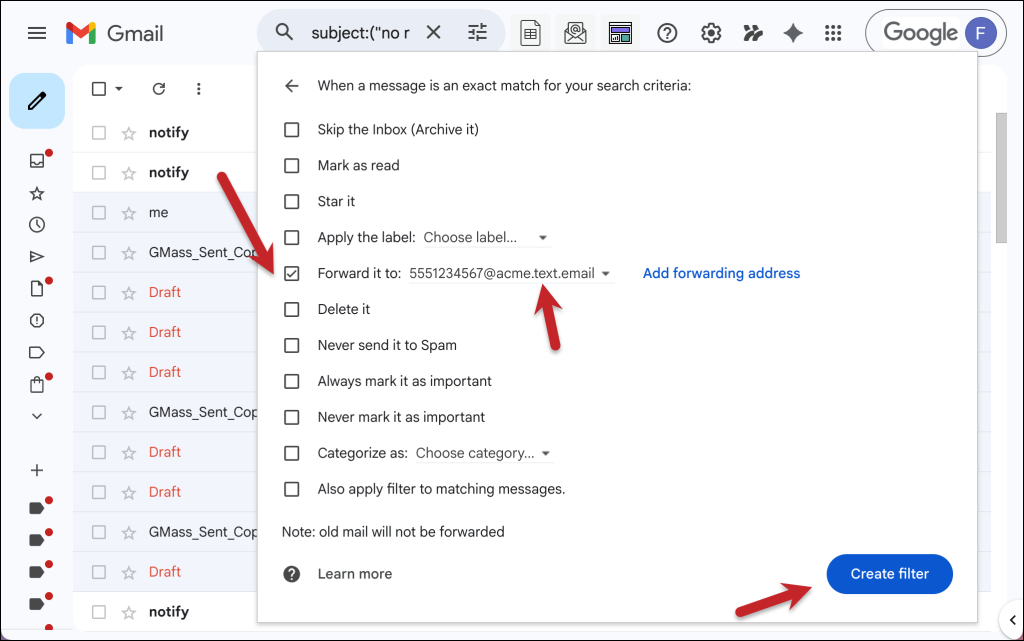
Then click the Create filter button.
You will now get only selected Yahoo Mail messages forwarding to you as texts.
Setting this up in Outlook
Outlook’s a little easier because, in a surprising twist, Microsoft is less strict than Google about where you’re forwarding your messages.
Go to Settings by clicking the icon in the top right. Then click on Mail, then Rules, then we’ll Add new rule.

Set up your conditions, choose Forward to as the action, and enter your email-to-text address.

Again, this is a daisy chain, but everything should run automatically once it’s set up.
Step 5: Customize the SMS format
Alright. We’re on to the last step. It’s an optional one, and only if you really want to fine tune things.
If you don’t want the entire email forwarded word-for-word as a SMS message, text.email has SMS formatting options that let you control exactly what shows up on your phone.
For instance: Alert from {from}: {subject} will just forward you who the message is from and what the email subject line is. (Then you can go to your email to investigate further.)
You can also use regex to make the formatting more detailed if you want to pluck out specific pieces of your emails to come to you as texts.
Yahoo Mail Text Alerts: Time to Get Rolling
So that’s what it takes to get text alerts for Yahoo Mail messages. I wish Yahoo made it easier to forward select messages, but the workaround is manageable (if not a little annoying here during the initial setup.)
The good news: After you set this up once, you can stop missing the emails that matter.
Also — hey, you can try all this out for free! Yahoo Mail Plus has a free 14-day trial. And with text.email, you don’t even need to sign up for a free trial. Just put yournumber@text.email in as the forwarding address and you can see a few email-to-SMS forwards in action.
Send an email to
your-number@text.email
and receive it as a text in seconds. No signup required.