
Links in Texts Are Now Shorter (Leaving More Room for Key Info)
When you’re working within the 160-character limit of a standard SMS message, every character counts.
If a message goes beyond that limit, it may need to be shortened, truncated, or sent using multiple SMS segments (depending on your text.email settings).
That is why text.email now uses a new, shorter domain for the links we add to your text messages: txt.ml.
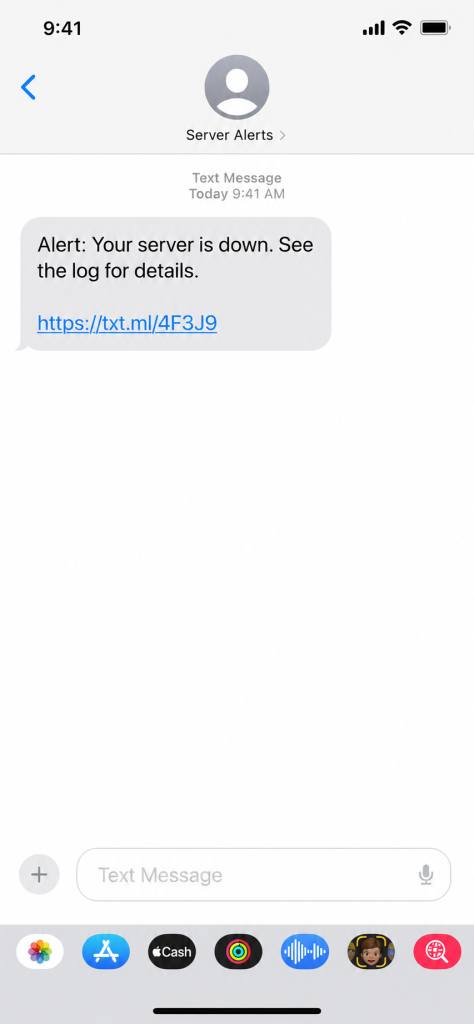
Previously, these links used text.email. Switching from text.email to txt.ml saves four characters every time one of these URLs appears in an SMS.
Shout out to the country of Mali for their perfect .ml domain suffix that I was able to use for this.
Setting This Up (Spoiler: No Setup Required)
You don’t need to do anything.
This change happens automatically whenever text.email generates a link. New links will use the shorter txt.ml domain without requiring any changes to your account, SMS formatting setup, or integrations.
Existing links using the text.email domain will still work.
Sp you can continue sending email to SMS messages through text.email just like you do today.
When does text.email add links to messages?
Sometimes an email contains content that cannot be placed directly into a standard SMS message.
The most common example are email attachments. Since an attachment can’t be included inside a traditional SMS text message, text.email stores the attachment securely and adds a link that the recipient can open. That link is now four characters shorter.
Why txt.ml?
There were two reasons we chose txt.ml.
- It’s significantly shorter than text.email.
- When you say “txt.ml” out loud, it sounds a lot like “text.email” — which makes it a natural shortened domain for the service.
Another Way text.email Delivers Short Text Messages Without Losing Information
Email is a long and sometimes verbose medium. Texts are shorter. (That’s part of why so many of us prefer texts to emails for quick, critical alerts — and, therefore, part of why text.email exists.)
The txt.ml domain is our latest step toward making sure you can cram everything you need for your most important messages into a single text.
- SMS formatting enables you to pluck key info out of long emails
- AI summaries turns long emails into single messages
- You can control the max number of SMS segments
- And if you really need images/audio inline or super long messages, you can use email to MMS
If you’re already a text.email subscriber, all of the features above — including automatic link shortening — are already live in your account.
And if you’re not using text.email yet, you can try it out without even signing up. Send an email to your-number@text.email and watch it come through to your phone as a text.
Send an email to
your-number@text.email
and receive it as a text in seconds. No signup required.