
New Number, Same Email Address: Number Replacements in text.email
Somewhere in your systems, an application is configured to email alerts to 4155550123@acme.text.email. And that works — until the person receiving those alerts changes their number, leaves the team, or hands that responsibility to someone else.
That is why we built number replacements in text.email. You can redirect messages from an old number to a new number or a distribution list, without tracking down and updating every application that uses the original number.
The replacement receives the message; the old number doesn’t receive a copy.
Here is how to set up a replacement, manage your saved rules, and understand what happens when messages arrive through email or the API.
How to Set Up a Number Replacement in text.email
It’s a quick process to create a replacement…
1. Open Number replacements in Settings
Sign in to text.email, open Settings, and find Number replacements.
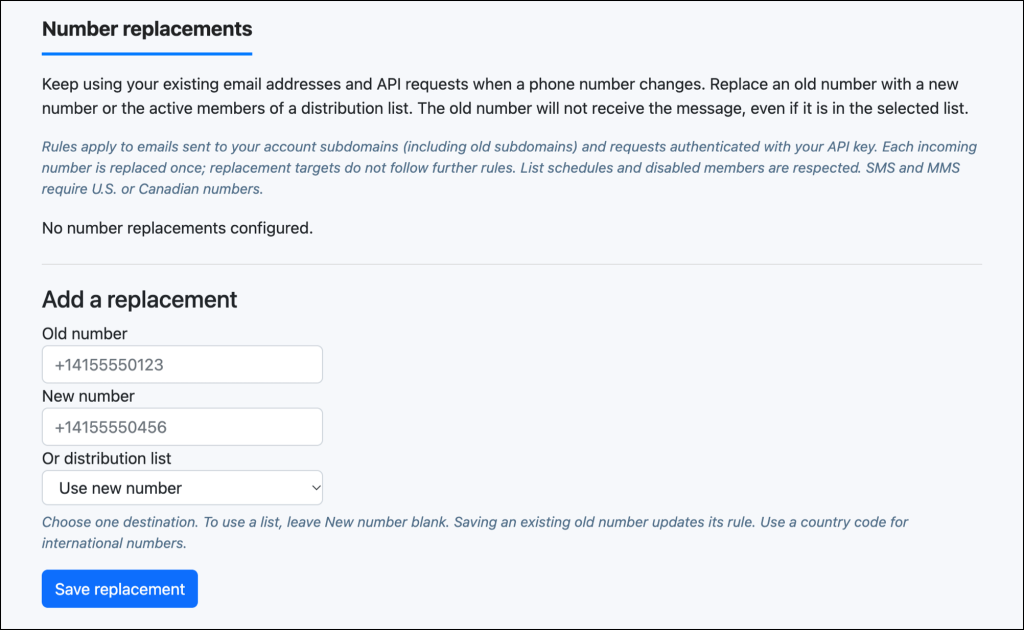
The Add a replacement form is where you connect the number your systems already use to the destination you want going forward.
2. Enter the old phone number
In Old number, enter the phone number currently used by your email or API integration.
For example, if a monitoring tool sends alerts to 4155550123@acme.text.email, enter 4155550123. You can also use the country-code format: +14155550123.
You’re entering just the phone number here, not the full email address. (Ten-digit numbers are treated as U.S. or Canadian numbers.)
3. Choose a new number or a distribution list
Each old number can point to one replacement destination:
- A new phone number. Enter it in New number and leave the distribution-list selection set to Use new number.
- A distribution list. Choose one of your existing lists and leave New number blank.
If you only want one phone to be the replacement, the use the “new phone number option.”
If those alerts now belong to a team (or should), choose a distribution list such as “On-call team.”
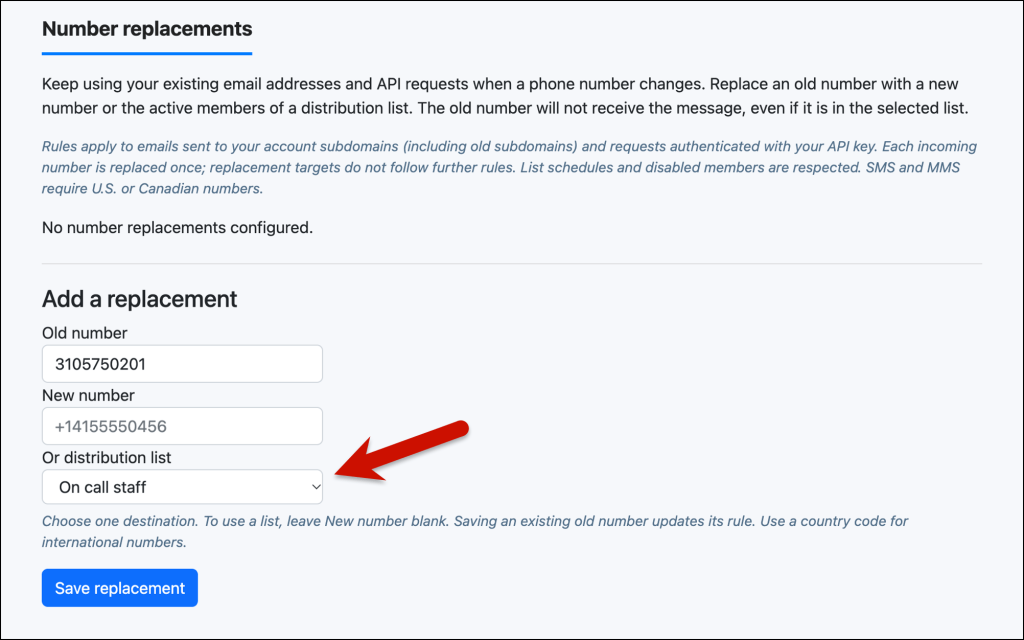
4. Save the replacement and send a test message
Click Save replacement. Your rule appears in the table of existing replacements.
Now send a test message through the integration you’re already using, still addressed to the old number. For example, with this rule:
Old number:  +14155550123
New number:  +14155550198
An email to 4155550123@acme.text.email produces a text addressed to 4155550198. Again, your sending application keeps its existing configuration.
If you selected a distribution list, check that the intended members receive the test. Their sending settings and schedules still apply.
How number replacements work with email and API requests
A replacement changes the destination when text.email processes an incoming message.
So API requests work (at least conceptually) the same as the email-to-text approach we just covered. Your application can keep sending the old number in the to field in its API requests.
For example, again, if you’re replacing 4155550123 with 4155550198, then this API call…
{
  "to": "+14155550123",
  "text": "The overnight backup has completed."
}
…would send to 4155550198 automatically.
text.email uses your saved replacement to determine the final destination before sending.
Rules belong to your account: another account can have a different replacement for the same number. Trial API requests do not use your rules, even if they supply your email address as the sender.
How to edit or remove a saved number replacement
The replacement table shows each Old number, its Replace with destination, and Edit and Remove actions. The “Replace with” has a label (phone numbers or distribution lists), so you can review your rules at a glance.
Click Edit to open the form.
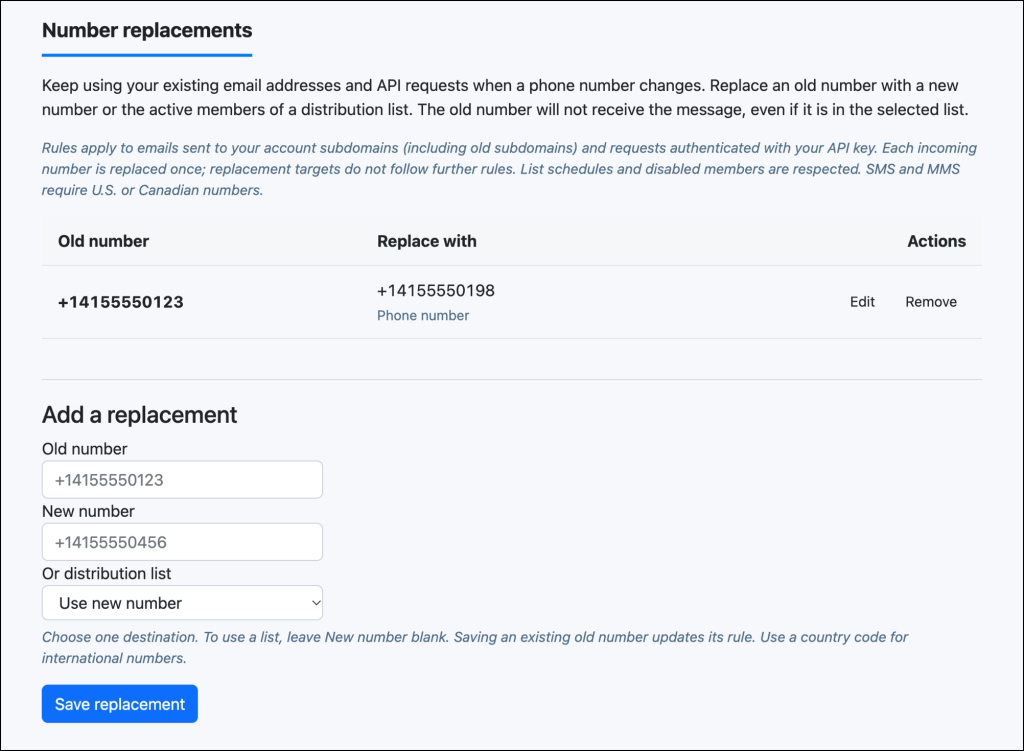
Change its destination and click Save changes.
Remove deletes the replacement rule. Future messages then follow normal routing to the original number. If you need to delete a distribution list used by a replacement, first remove that rule or point it somewhere else.
Number Replacement Limits and Delivery Behavior
Ok, now that we have the basics down, here’s the nuance.
How distribution lists behave with number replacements
When a replacement points to a distribution list, text.email checks that list’s membership when processing the message. So you can maintain the team’s recipients in the list without changing the replacement rule.
- Disabled members are excluded. A replacement does not override a member’s sending setting.
- Member schedules still apply. Scheduled members receive messages according to their configured availability.
- Duplicate numbers are consolidated. Repeated entries in the replacement list do not create extra copies for that number.
- The old number stays excluded. Even if it remains a member of its replacement list, it does not receive the redirected message. (In other words, it won’t create an endless loop of sending because the replaced number is in the list.)
If there are no eligible recipients on the distribution list, nothing is sent for that replacement. text.email does not fall back to the old number. The API returns a no_recipients error in this situation.
Rules also apply to numbers found in a list addressed by email. If an existing list contains an old number with a replacement rule, text.email resolves that number before sending. In other words, if someone who used to be 6172453232 is on the list and you replaced their number with 6178292012, then text.email will know to send to 6178292012.
Your saved list membership is not rewritten, so removing the rule restores the original routing.
Replacement rules apply once per incoming number
Suppose number A points to B, and B has its own rule pointing to C. A message originally addressed to A goes to B. It does not continue through B’s rule to C.
This prevents rules from creating loops. To send A’s messages to C, update A’s destination directly.
Sending limits count the final recipients
Normal account limits still apply. A two-part SMS sent to three recipients uses six message units. API replacements are subject to a maximum of 100 message units per request.
SMS and MMS replacement destinations must be U.S. or Canadian numbers. Replacements also work with configured iMessage routes, which support international numbers.
Message history and API retry protection follow the send
Message logs record the resolved recipients, so you can see the actual destinations.
For API integrations, retrying an already accepted request with the same idempotency key does not create another send, even if you have since changed the replacement rule. Use a new idempotency key when sending a new message.
Need to Replace a Number for a text.email Alert?
A changed phone number shouldn’t mean hunting through every application that sends an alert.
Number replacements in text.email give you one place to update the destination, whether those messages now belong to a different phone or an entire team.
Open Settings > Number replacements, add your rule, and you’re all set.
Want to give text.email a try? You don’t need to sign up in advance — just send a sample alert email to your-number@text.email and watch it come through to your phone as a text.
Send an email to
your-number@text.email
and receive it as a text in seconds. No signup required.