
Text Alerts for Email: Get SMS Notifications from Gmail, Outlook & More
I’m guessing you’re here looking for text alerts for email because you’ve realized what so many of the rest of us have realized: They’re the only notifications that still get our attention.
All my email push messages get lumped together. Same with app notifications. But not texts.
So what are we going to do about it?
The solution that I’m happy to offer up is… email-to-text. You have Gmail or Outlook or whatever automatically forward emails to a special address, and the alerts come to your phone as SMS messages.
Yes, it’s that simple. We’re not going to vibe code a whole system here; we’re going to drop in one email address into the right place in our email settings.
In this article, I’ll briefly go over the concept of email to text and then go over how to set up text alerts for Gmail, Outlook, Yahoo, and more.
Text Alerts for Email: Table of Contents
- What Is Email-to-Text and How Does It Work?
- How Gmail, Outlook, and Yahoo Handle Email Forwarding
- Text Alerts for Email: Try It Now (No Signup Required)
What Is Email-to-Text and How Does It Work?
Email-to-text isn’t exactly ambiguous jargon. It does exactly what it says it’s going to do: Take an email and turn it into a text message.
There are a handful of services out there that can do email-to-text. (Why only a few? It’s surprisingly complicated behind the scenes, especially when it comes to handling a bunch of texting regulations called A2P 10DLC.)
The service that doesn’t make you jump through any of those hoops is text.email. It’s legitimately a drop-in solution.
When you sign up, you get a personal address (it’ll be your-number@your-subdomain.text.email).
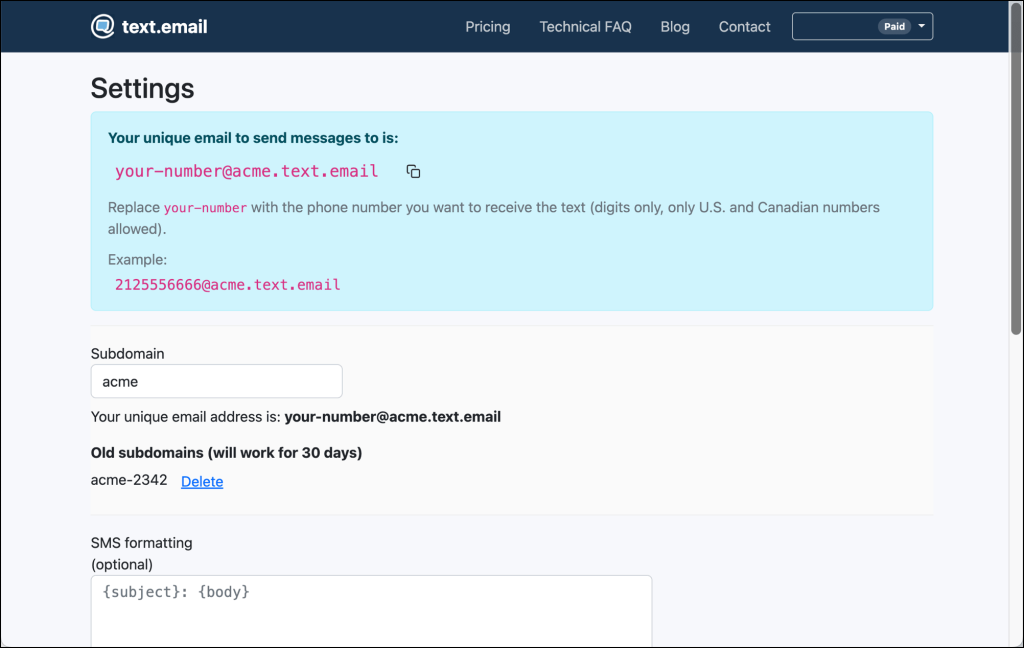
Any email sent to that address gets converted to SMS and delivered to your phone.
Did the cell phone companies used to offer something like this or is that in my imagination?
Yes. For the past 25 years or so, pretty much every cell phone company offered email-to-text as part of your plan.
But starting around 2024, they began killing off that service. Today, it’s either gone (from services like AT&T) or so erratic and crippled it’s essentially gone (from services like Verizon and T-Mobile).
Why’d they get rid of the service? The official reasons are: Too much spam… and all the issues with those regulations I mentioned earlier. Unofficially, they also likely dropped the programs because they weren’t financially worth the hassle to multi-billion-dollar companies.
Regardless… you don’t need them to get text message alerts from your emails.
All you need to do is:
- Get your text.email address
- Tell your email provider to forward certain messages there
How Gmail, Outlook, and Yahoo Handle Email Forwarding
While the basic concept for email filtering/forwarding to text is the same, each of the email providers is a little different.
| Action | Gmail | Outlook | Yahoo Mail |
|---|---|---|---|
| Forwarding | Free | Free | $5/month (Mail Plus) |
| Selective forwarding | Yes (filters) | Yes (rules) | No |
| Verification step | Yes (confirmation email) | No | Yes (confirmation email) |
| Setup time | ~8 minutes | ~5 minutes | ~10 minutes |
Text alerts for Gmail: Forwarding with filters
Gmail gives you total control over which emails become texts.
Forwarding is free, and Gmail’s filter system lets you set precise conditions. You can filter by sender, subject line keywords, whether the email has attachments, and more.
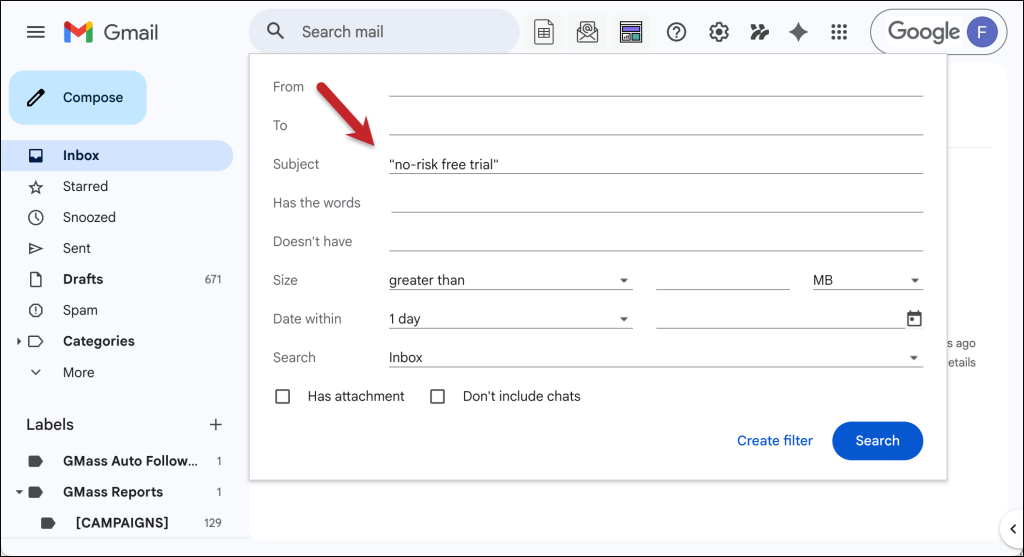
So you could set up a filter that says “only forward emails from alerts@monitoring.io with ‘CRITICAL’ in the subject” and leave everything else alone. Or, like I did in the screenshot, filter replies to a cold outreach campaign that had “no-risk free trial” in your subject line.
Gmail treats forwarding and filtering as two separate setup steps. Forwarding lives in Settings → Forwarding and POP/IMAP. Filters live in Settings → Filters and Blocked Addresses.
Our full guide walks you through both, including screenshots.
If you want every email to become a text (for a low-volume or dedicated inbox), you can skip the filter entirely and just forward everything.
Full setup guide: How to Get Text Alerts for Important Gmail Messages
Text alerts for Outlook: Forwarding with rules
Outlook has the simplest setup of the three major email providers for email-to-text alerts.
Like Gmail, forwarding is free. And Outlook’s Rules give you the same kind of selective forwarding (e.g., by sender, subject line, importance level, or other conditions).

The two main differences from Gmail: Outlook doesn’t send a verification email to your forwarding address, and setting up its rules is a little quicker than setting up a Gmail filter.
Whether you forward everything or create a rule for specific emails, the setup takes about five minutes. It’s the fastest path from “I want text alerts on specific emails” to actually getting them.
Full setup guide: How to Get Text Alerts for Your Most Important Outlook Emails
Text alerts for Yahoo Mail: Paid forwarding, no filters
Yahoo is the outlier — and not in a good or fun or quirky way.
Back in 2021, Yahoo pulled auto-forwarding from free accounts and locked it behind Yahoo Mail Plus (~$5/month). So no, we can’t set up email-to-text alerts on your free account.
Yahoo’s forwarding is also all-or-nothing. You can’t say “only forward emails from this sender” or “only forward emails with a certain subject line.”
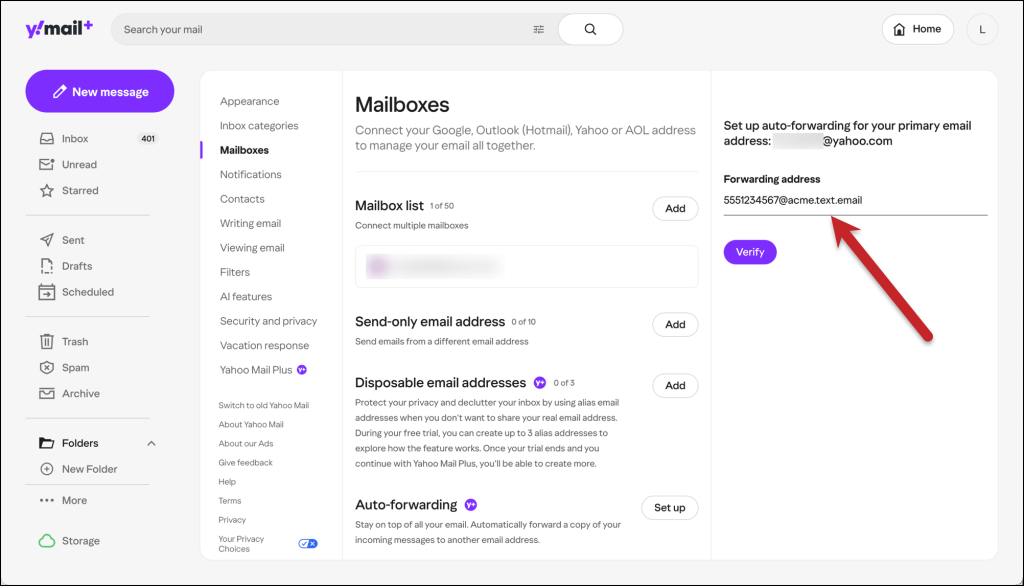
Yahoo does have a Filters feature, but it can only sort messages into folders. You can’t then use that filtering for forwards.
If your Yahoo inbox is low-volume or dedicated to alerts, the direct route works fine. (But what are the odds of that?)
If you need to be selective about which emails become texts, in the guide linked below I wrote a step-by-step workaround.
It’s an extra hop, and yes, a pretty hacky one. But once it’s set up, the chain runs automatically.
Full setup guide: How to Get Text Alerts for Important Yahoo Mail Messages
Text alerts for iCloud, Zoho, and other email providers
Hey, good news: Email-to-text alerting with any provider that supports forwarding. And that includes a lot of the providers in the next popularity tier down.
iCloud Mail has free forwarding with rules-based filtering (Settings → Mail Forwarding). You can forward everything or just specific emails. So it’s closer to Gmail than Yahoo.
Zoho Mail is offers both blanket forwarding and filter-based forwarding… but only on paid plans. The free tier can’t forward at all.
ProtonMail supports forwarding with custom conditions on paid plans (Mail Plus and above). You can forward everything or set rules by subject, sender, and other criteria.
Fastmail supports forwarding with rules on all plans.
The principle is always the same. If your email provider lets you forward to an external address, you can point it at your text.email address and get SMS alerts.
Some providers charge for forwarding, some don’t. Some let you filter, some don’t. But the email-to-text-alert mechanic is always the same setup.
Text Alerts for Email: Let’s Get Started
So, yes, you can get SMS alerts when important emails come in. The process is relatively simple (unless you’re daisy chaining together the Yahoo solution): Get your email-to-SMS address from text.email, set up your mail filtering and forwarding, and you’re good to go.
But if you want to see this in action before you subscribe to an email-to-text account, you can do that too.
With text.email, you can get a free trial without signing up (or putting in a credit card… or even visiting the website). Just use yournumber@text.email and drop that in as the forwarding address in your email client. You’ll be able to test out this system and see some email-to-text forwards in real time.
Once you see it work, check out your provider guide above and set up forwarding. You can go from “that’s cool” to “my important emails are texting me” in about ten minutes.Ok
Send an email to
your-number@text.email
and receive it as a text in seconds. No signup required.