
Using the text.email API to Send Texts From Your Apps
The premise of text.email has always been: sending a text should be as easy as sending an email. And that’s great when you’re dropping your email-to-text address into a service dashboard that already sends email notifications.
But when you’re building an app, writing a script, or setting up an automated workflow, sending an email just to generate a text adds an extra step.
We built the text.email API so your software can now send messages directly. Your program supplies a phone number and a message, and text.email handles sending it as SMS, MMS, or iMessage.
Here’s everything you need to know about when to use it and how to set it up.
text.email API: Table of Contents
When to Use Email-to-SMS vs. the API
The quick version:
Use email-to-text when it fits into your existing workflow. (For example: You have a SCADA controller with an email alert field, and you want a quick way to get text alerts.)
Use the API-to-text when you want texting built directly into your software. (For example: to send an appointment reminder when your scheduling system triggers it, notify yourself when a script finishes, or alert a customer when an order is ready).
What you can do with the API
You can send SMS, MMS, or iMessage. (SMS is the default.)
You can send those with a browser URL, JSON request, or form post.
There’s no need to configure an outgoing mail server or go through the email step; you can get started with a single URL.
The API also gives your software a structured response on which to act. That way, your software can tell whether a request was accepted or rejected, handle errors, and retry without accidentally sending the same message twice.
You can include one image (JPEG, PNG, or GIF) with an MMS message.
What you can’t do (yet) with the API that you can do with email-to-text
You can’t use distribution lists or on-call schedules with the API.
You can’t send multiple media files as attachments with the API; you can send one image as a part of an MMS message. (Also, with the API, SMS and iMessage are text-only.)
And, of course, you can’t just drop in an address somewhere to get quick email-to-text messages.
How to Use the text.email API
Let get you started sending messages with the text.email API.
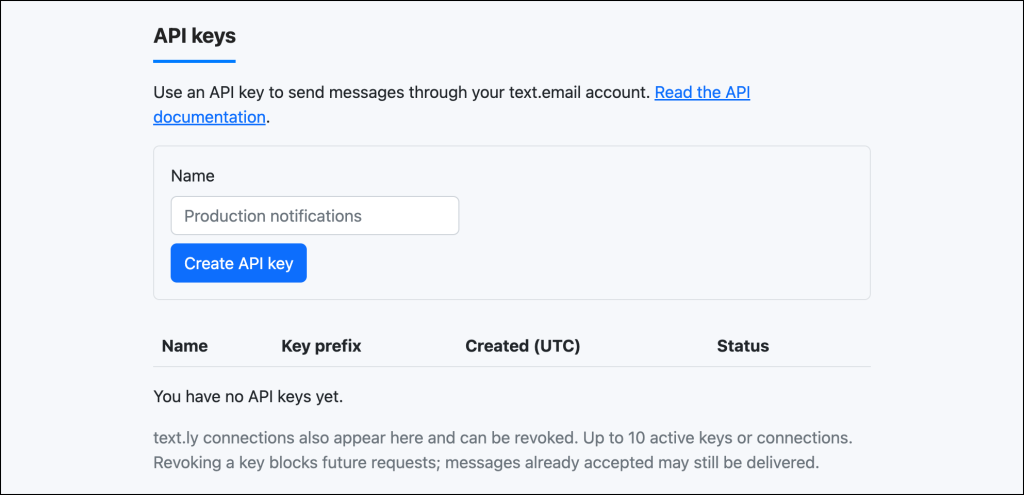
Get your text.email API key
You can get your API key in the text.email settings. API access is currently included with all plans.
And this is the shape for your calls…
text.email API request fields
| Field | Meaning |
|---|---|
api_key |
Your API key, when not using an authentication header. Supported in the query string, JSON or form. Omit all credentials for anonymous testing; an empty or invalid supplied key is an error. |
to |
Required phone number. Prefer international format such as +14155550123. SMS and MMS support U.S. and Canadian numbers. iMessage accepts international numbers that can receive iMessages. |
text |
Required message: up to 1,000 characters for SMS/MMS or 16,000 for iMessage. Long SMS is split into segments within your account’s configured segment limit; an oversized request is rejected, never truncated. |
type |
Optional: sms, mms, or imessage (case insensitive). Defaults to sms. The API honors this choice even if your email settings prefer another channel. |
from_email |
Required for anonymous tests. Omit when using an API key. |
idempotency_key |
Optional retry identifier, supplied in the query string, JSON or form, or through the Idempotency-Key header. |
media |
Optional for MMS only. One object with content_type (image/jpeg, image/png, image/gif) and data_base64 (base64 file bytes, no data-URL prefix). Maximum decoded size: 600,000 bytes. Text-only MMS is supported. |
Access via a URL (mainly for testing, since this exposes your API key)
Replace the phone number, key, and message in the URL below, then paste it into your browser. It sends the message and returns JSON.
https://api.text.email/v1/messages?api_key=YOUR_API_KEY&to=14155550123&text=Remember%20the%20milk.&idempotency_key=reminder-001Add &type=mms or &ype=imessage if you want one of those message types, otherwise the API will use the default of SMS.
A U.S./Canadian number can be written as 14155550123 without a plus sign. If you do include the plus sign in a URL, write it as %2B. Most servers read a bare + in a URL as a space.
Keep the same idempotency_key to refresh or retry without sending again. If you omit it, each visit or refresh can send another message. Browser login cookies aren’t used to authenticate sends.
Using the API in your application
There are three different forms this can take: key in the Authorization header, key in the JSON body, and form post. The examples below use curl.
API key in the Authorization header
curl https://api.text.email/v1/messages \
  -H "Authorization: Bearer YOUR_API_KEY" \
  -H "Content-Type: application/json" \
  -H "Idempotency-Key: reminder-2026-001" \
  -d '{"to":"+14155550123","text":"Remember the milk."}'
API key in the JSON body
curl https://api.text.email/v1/messages \
  -H "Content-Type: application/json" \
  -d '{"api_key":"YOUR_API_KEY","to":"+14155550123","text":"Remember the milk.","idempotency_key":"reminder-002"}'
Form post
curl https://api.text.email/v1/messages \
  --data-urlencode "api_key=YOUR_API_KEY" \
  --data-urlencode "to=+14155550123" \
  --data-urlencode "text=Remember the milk." \
  --data-urlencode "idempotency_key=reminder-003"
MMS and iMessage
The MMS and iMessage examples below are just the request body. Send them like the first example, with your Authorization header and
Content-Type: application/json.MMS
{
  "to": "+14155550123",
  "type": "mms",
  "text": "Your delivery is here.",
  "media": {
    "content_type": "image/jpeg",
    "data_base64": "BASE64_ENCODED_JPEG_BYTES"
  }
}
iMessage
{"to":"+14155550123","type":"imessage","text":"Remember the milk."}iMessages are queued for delivery by text.email’s Mac sender. They do not automatically fall back to SMS — meaning if your recipient doesn’t have an iPhone, they won’t get this message.
Media attachments are only currently supported with MMS, not iMessage (or SMS).
Other details on sending with the API
Both standard URL-encoded forms and multipart forms are supported. For multipart clients, use the same field names. MMS file bytes use the JSON media object from the MMS example above.
As I noted earlier about the exposed API keys, URLs can appear in browser history, server logs, and chat/social media previews. So use a header or request body when you need to keep credentials and message text out of URLs. (Which, frankly, is the standard best practice anyway.)
GET and POST use the same endpoint. You can mix locations, like an API key in a header, to in the query string and text in JSON.
Any repeated fields across locations must match exactly; conflicting values return 400. Duplicate query or form parameters are rejected. JSON field names are case sensitive.
API requests require HTTPS and have a maximum body size of 900,000 bytes. Use a JSON or form body (not a URL) for larger messages, and the JSON media object for MMS images. URLs are subject to browser and web-server length limits.
Responses and safe retries
HTTP/1.1 202 Accepted
{“id”:”e4199a63-2f96-42a7-b895-e789ae891c9b”,”type”:”sms”,”status”:”accepted”,”units”:1}
Here’s what this response means.
Status
acceptedmeans the SMS/MMS provider accepted the submission; it does not confirm delivery.queuedmeans iMessage was added to the delivery queue.unknownmeans a provider outcome was uncertain, or only part of the message was accepted.processing_or_unknownmeans the request started but a final response has not been recorded. (Don’t resend an uncertain message with a new key.)”
Use a different idempotency_key for each intended message and reuse it when you’re retrying the same request.
Idempotency keys are scoped to your account (or to your email and IP address for trial tests). So if your first attempt was a browser URL, you can retry with the Idempotency-Key header and get the stored result instead of a second text.
Replays return the stored result without sending again, even when you’re changing from a browser URL to JSON or a form; changed message content with the same key returns 409.
You should only omit this identifier if you want each request to be a new send.
Also, account requests are limited to 60 per minute. Replaying an idempotency key doesn’t consume another send allowance.
Units
The units field counts SMS segments (154 GSM septets or 67 Unicode code units each), or one MMS/iMessage submission.
A note about your character count: API messages use the supplied text directly, so other things that you have text.email add to your email-to-text messages (for example: elements from your email formatting templates or acknowledgement reminders) are not applied.
Accepted messages appear in your message history and count toward your usage. (Your account’s verification, trial, sending limits and screening rules still apply.)
Errors
{"error":{"code":"invalid_api_key","message":"The API key is invalid or revoked."}}Here are some of the errors you might get:
- 400: invalid fields
- 401: invalid key
- 403: account or screening restriction
- 409: idempotency conflict
- 413: request too large
- 415: wrong content type
- 429: request or sending limit
- 503: temporarily unavailable
If a request fails before sending, its error may be stored for that idempotency key. Correct the problem and use a new key only once the response confirms that no message was sent.
More on the 429 error, since it’s one of the few up there that isn’t self-explanatory.
A 429 response indicates a rate or test limit; some test limits require an account or upgrade rather than waiting.
Ready to Try the text.email API?
text.email is great for email-to-SMS… but sometimes, you need app-to-SMS instead.
With the text.email API, you can now skip the whole “email” part and easily send SMS, MMS, and iMessages directly from your tool or application.
And… you don’t even need to sign up to see it in action.
You can send a trial test right now (and up to 10 total tests) without a text.email account.
Use your own phone number and email address with these…
https://api.text.email/v1/messages?from_email=youremail%40yourdomain.com&to=14155550123&text=My%20first%20API%20text.&idempotency_key=first-browser-testcurl https://api.text.email/v1/messages \
-H "Content-Type: application/json" \
-H "Idempotency-Key: my-first-api-test" \
-d '{"from_email":"youremail@yourdomain.com","to":"+14155550123","text":"My first API text."}'Notes: These trial messages are logged as public tests, just like trial email-to-text messages, so don’t include private information. Supplying an account’s email address does not authenticate you or use that account’s paid allowance. An invalid or revoked API key returns an error.
After you’ve given it a try, you can sign up for text.email — it takes less than a minute — and you’ll have full access to email-to-SMS and the text.email API for sending your critical messages.
Send an email to
your-number@text.email
and receive it as a text in seconds. No signup required.